Recording a lecture feels like studying. It isn't — it's postponing studying. An hour of audio on your phone is an hour you still have to sit through again, and nobody replays a nine-week backlog of recordings the night before an exam. The recording only becomes useful when it becomes text you can search and notes you can revise from. This guide covers the whole pipeline: getting permission, capturing clean audio in person or online, and turning the recording into exam-ready notes in minutes instead of another hour. (Already have a recording sitting on your phone? Jump straight to lecture transcription.)
Step 0: ask before you record
This is the step most guides skip, and it's the one that can actually get you in trouble. Whether you may record a lecture depends on three things: your university's recording policy (often in the student handbook or course syllabus), the lecturer's consent, and in some places local recording law. Some universities permit recording for personal study by default; others treat lectures as the lecturer's intellectual property and require explicit permission. If you have a disability accommodation, you often have a formal right to record — your accessibility office can confirm it in writing.
In practice, a one-line email works almost every time: "Would you mind if I record your lectures for my own revision? I won't share the recordings." Most lecturers say yes, some will point you to an official recording they already make, and either way you're covered. Two rules keep you safe everywhere: recordings are for your own study, and they never get posted or shared.
The best lecture recorder is one you already own
You don't need a dedicated voice recorder. For in-person lectures, the phone in your pocket records perfectly serviceable audio, and for online lectures your laptop can capture the audio directly — no microphone involved at all.
In-person lectures: your phone
- Sit in the front third of the room. Position beats equipment. Every meter closer to the lecturer roughly doubles how clean your recording sounds compared to the echo at the back.
- Use the built-in recorder app (Voice Memos on iPhone, Recorder on Android) and put the phone on the desk with the microphone end toward the speaker — not in your bag, where fabric muffles everything.
- Airplane mode on. It prevents a mid-lecture call from splitting your recording, and stops notification thumps landing right on top of the one definition you needed.
- Check storage and battery once, then stop worrying. An hour of voice recording is small — roughly the size of a few photos — so a semester of lectures fits on any phone.
Online lectures: your laptop
For a lecture delivered over Zoom, Teams, or a university streaming portal, don't point a microphone at your speakers. Vowen can capture and transcribe the computer's audio directly on Mac and Windows while you watch, so the "recording" step and the "transcribing" step happen at the same time — you leave the lecture with the text already done. The same permission rule applies: recorded online classes are still the lecturer's material.
From recording to exam-ready notes
Here's the part that saves you the second hour. The old way to use a lecture recording was to replay it at 2× speed and type notes — which is why most recordings never got used. The better pipeline has three short steps:
1. Transcribe the recording
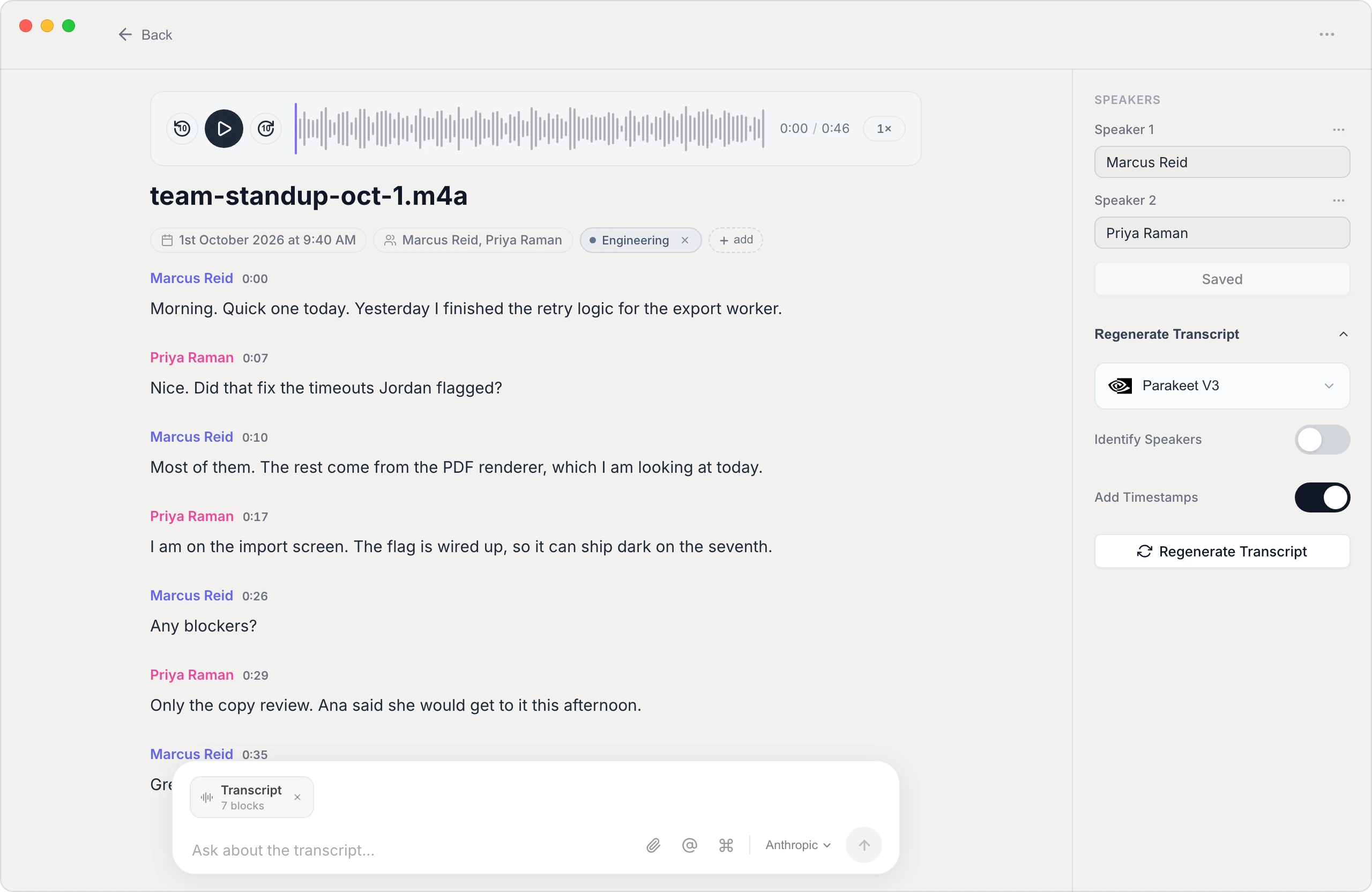
Drop the audio file from your phone into Vowen (AirDrop or a cable gets it to your laptop) and it transcribes the full lecture on your own device — an hour of audio becomes searchable text in a few minutes, and the recording never gets uploaded to anyone's server. That privacy point isn't academic: a lecture recording contains your professor's voice and your classmates' questions, which isn't really yours to hand to a cloud transcription company.
2. Let AI draft the structure
A raw transcript is better than audio, but it's still an hour of spoken sentences. Vowen's AI summarization drafts structured notes from the transcript — the key concepts, definitions, examples, and any "this will be on the exam" moments — so you start from an organized draft instead of a wall of text.
3. Make it exam-ready yourself
The last step is deliberately manual, because editing is revision. Go through the draft against the transcript and: pull every definition into its own list; turn the professor's examples into worked problems; and rewrite section headings as questions ("What causes X?") so the notes double as a self-test. Fifteen minutes of this per lecture beats an hour of passive re-listening — and because the full transcript is searchable, anything you cut is still one keyword away when a past-paper question surprises you.
What a semester of this looks like
- During the lecture: record, and jot only cues — emphasis, confusion, hints. You're free to actually listen.
- Same day (10–15 minutes): transcribe, skim the AI draft, fix anything it misheard while the lecture is fresh.
- Weekly: merge the week's notes into one question-formatted revision sheet per topic.
- Before the exam: revise from your sheets, and search the transcripts for anything the past papers reveal you skimmed.
The bottom line
Recording lectures is only half a study system — the other half is turning audio into text you can search and notes you can revise. Ask permission, record on whatever device you have, and let the transcription happen on your own laptop. Vowen's free tier is enough to try the whole record → transcribe → notes pipeline on this week's lectures and see how much of the semester it gives you back.
See it in Vowen
Frequently asked questions
Is it legal to record a lecture?
It depends on your university's policy and your local law, not just the professor's mood. Many universities allow recording for personal study, some require the lecturer's permission, and students with accessibility accommodations often have an explicit right to record. The safe pattern everywhere: ask first, keep recordings for your own study, and never share them publicly.
What is the best way to record a lecture?
Use the device you'll actually have with you. A phone's voice recorder app in the front third of the room captures most lecturers clearly, and a laptop works just as well for online classes since it can capture the computer's audio directly. Positioning matters more than gear: closer to the speaker beats a better microphone at the back.
How do I turn a recorded lecture into notes?
Transcribe it first, then condense. Modern on-device speech recognition turns an hour of lecture audio into searchable text in minutes, and AI summarization can draft structured notes — key concepts, definitions, and action items — from that transcript. You then spend your time reviewing and correcting, which is itself effective revision.
Can I transcribe lectures without uploading them to the cloud?
Yes. On-device transcription apps process the audio entirely on your own laptop, which matters for lectures: recordings of a professor's voice and classmates' questions aren't really yours to upload to a third-party server. Vowen transcribes locally on Mac and Windows, so the recording never has to leave your machine.
Should I still take notes by hand if I'm recording?
Yes — but different notes. Recording frees you from transcribing the lecture in real time, so write down the things a recording can't capture: what the professor emphasized, what confused you, what they hinted would be on the exam. Light cues plus a full transcript beat frantic verbatim notes on both counts.
Talk instead of type.
Vowen is voice-to-text that works in any app, on Mac and Windows. Dictation is free and unlimited, no account required.