Scope beyond dictation.
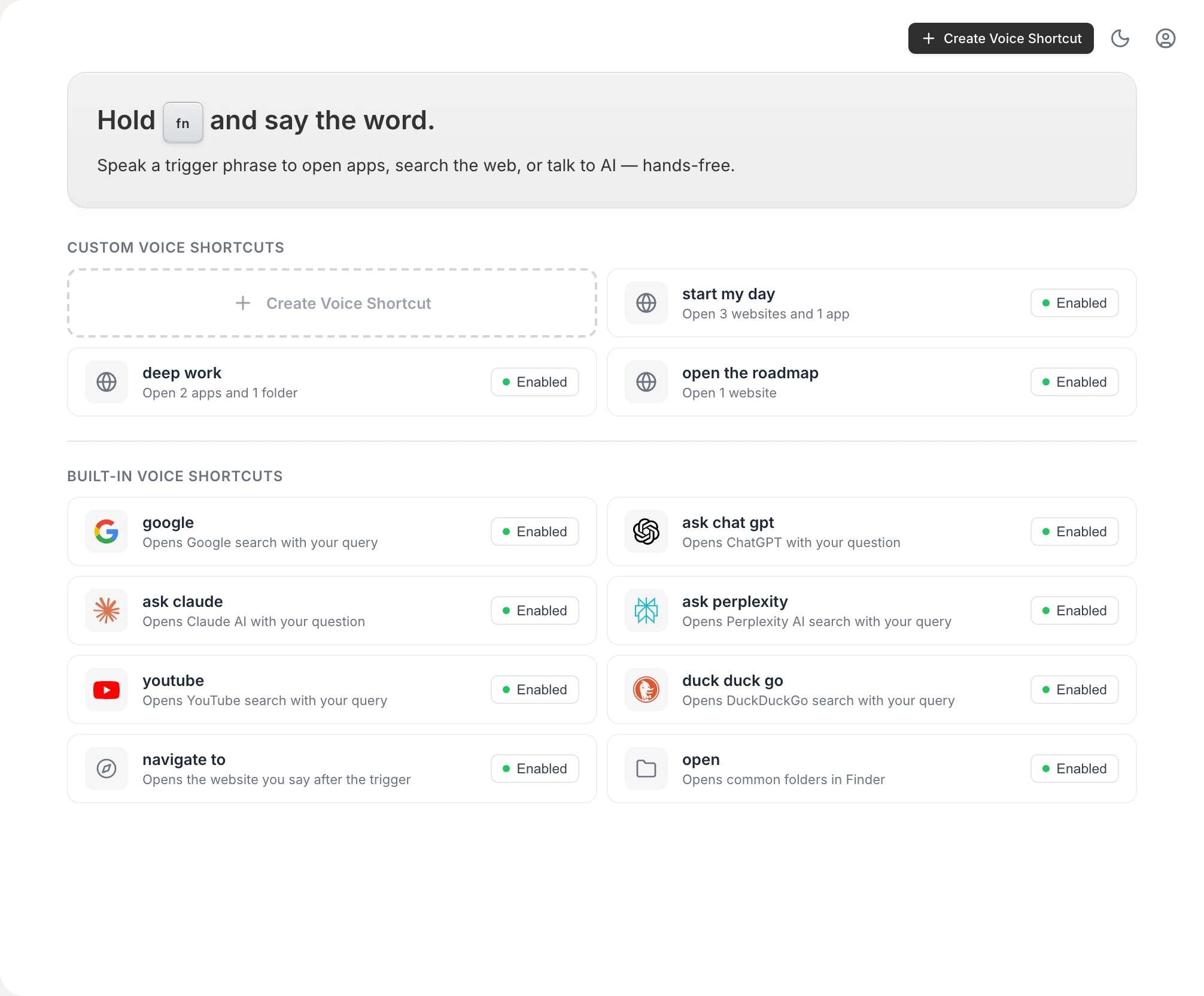
Flow has dictation, commands and a notetaker. Vowen adds voice shortcuts that open apps, sites and scripts, built-in utilities like timers and PDF merges, and file transcription with SRT and VTT export.
Wispr Flow is a polished cloud dictation app. Vowen dictates on your machine or with your own keys, then goes further: voice shortcuts, file transcription and on-device speaker labels, for one price, once.
Free forever for dictation. Mac and Windows. No account required.
 Wispr FlowVowen
These are the areas where Wispr Flow's approach stands out.
Flow has invested heavily in the dictation surface: filler-word removal, automatic formatting and tone adjustments. The editing layer is well developed.
Cloud transcription can beat on-device models in specific conditions, like heavy accents, fast speech and noisy rooms, because it can run larger models.
Flow runs a central cloud service with opt-in usage data, so its model can be refined on real voices from users who choose to share. Local-first tools that do not collect data cannot iterate this way.
Server-side processing means no CPU or memory draw on your machine while transcribing. That can matter on older or battery-constrained laptops.
Four design decisions that separate Vowen's approach from Wispr Flow's.
Flow has dictation, commands and a notetaker. Vowen adds voice shortcuts that open apps, sites and scripts, built-in utilities like timers and PDF merges, and file transcription with SRT and VTT export.
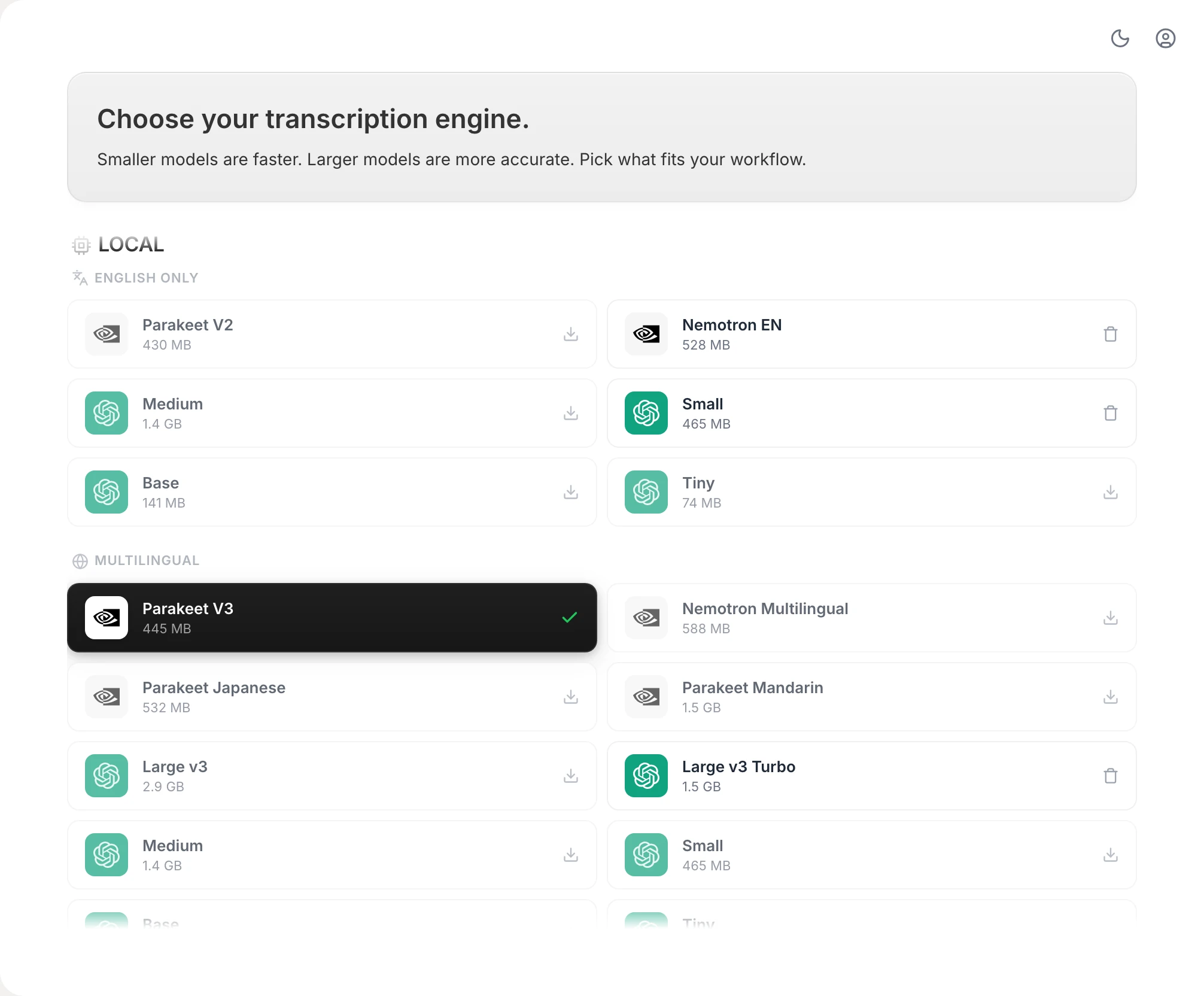
Run Parakeet, Nemotron or Whisper on your machine, or bring a cloud model with your own key. Local mode keeps audio on your Mac or PC.
You bring the key, for speech and for AI: 15 cloud speech services, plus OpenAI, Anthropic, Gemini, Groq, DeepSeek, OpenRouter or any OpenAI-compatible endpoint. No single provider's pricing or roadmap.
Speech, on your machine or your key
AI cleanup and commands, your key
Vowen is a lifetime license. One payment, every future update included. Nothing to renew, nothing to expire.
$49once
| Feature | Wispr Flow | Vowen |
|---|---|---|
| Pricing | ||
| Free plan | Wispr FlowAvailable | VowenAvailable |
| Dictation limit | Wispr Flow2,000 words / week | VowenUnlimited |
| Paid plan model | Wispr Flow$15 / month | Vowen$49 one-time |
| Year 1 paid cost | Wispr Flow$180 | Vowen$49 |
| Year 3 paid cost | Wispr Flow$540 | Vowen$49 |
| Lifetime updates | Wispr Flow | Vowen |
| Privacy and processing | ||
| Local transcription option | Wispr Flow | VowenDefault |
| Cloud transcription option | Wispr FlowAlways | VowenOptional (your key) |
| Audio stays on device | Wispr Flow | VowenYes (local mode) |
| Works offline | Wispr Flow | VowenYes (local mode) |
| Cross-device sync | Wispr FlowBuilt-in | VowenPro, through your own cloud |
| Model improved via user data | Wispr FlowOpt-in | Vowen |
| AI flexibility | ||
| Default text cleanup (grammar, punctuation) | Wispr FlowBuilt-in | VowenRequires AI setup |
| Custom cleanup instructions | Wispr Flow | Vowen |
| Bring your own API key | Wispr Flow | VowenOpenAI, Anthropic, Gemini, Groq, DeepSeek, OpenRouter and more |
| Swap models per task | Wispr Flow | Vowen |
| Custom AI provider endpoints | Wispr Flow | Vowen |
| Beyond dictation | ||
| Voice shortcuts (apps, websites, scripts) | Wispr Flow | Vowen |
| Voice text commands (rewrite, translate, format) | Wispr Flow | Vowen |
| Voice system commands (PDFs, timers, conversions) | Wispr Flow | Vowen |
| Meeting notes | Wispr Flow | Vowen |
| Speaker labels from the audio, on-device | Wispr FlowFrom the Google Meet UI | Vowen |
| File transcription with SRT, VTT and PDF export | Wispr Flow | Vowen |
| Platforms and languages | ||
| macOS | Wispr Flow | Vowen |
| Windows | Wispr Flow | Vowen |
| iOS | Wispr Flow | VowenComing soon |
| Android | Wispr Flow | Vowen |
| Dictation languages | Wispr Flow100+ | Vowen99 |
| Custom vocabulary | Wispr Flow | Vowen |
Still deciding? Ask us anything.
Yes. Both put voice dictation everywhere on your computer, with different architectures. Wispr Flow is cloud-based and subscription-priced. Vowen runs speech models on your machine, or uses your own key for a cloud model, and is a one-time license. Vowen also adds voice shortcuts, file transcription and on-device speaker labels.
By default, no. Vowen transcribes locally with Parakeet or Whisper, and audio does not leave the device. Optional cloud features use your own API key. For AI cleanup, only the resulting text is sent to the model you choose, not the raw audio.
Vowen covers dictation on both macOS and Windows, so the core surface is comparable. Custom vocabulary can be re-entered in a few minutes. Meeting notes work much like Flow's Notetaker. Voice shortcuts, built-in utilities and file transcription are new.
Yes for the core. Dictation, meeting transcription, speaker labels and custom vocabulary all run locally. AI cleanup and Command Mode need a language model: a cloud key, or a local one such as Ollama if you want them offline too.
Free to install. No account needed. See if voice fits your workflow.