


 4
4
 Daniel Okafor


 Notes
Notes New message
$49, once.
No subscription. Ever.
Hold a key and speak into any app. Vowen also writes up your calls without a bot, on speech models that run on your own machine.
Dictation is free and unlimited.
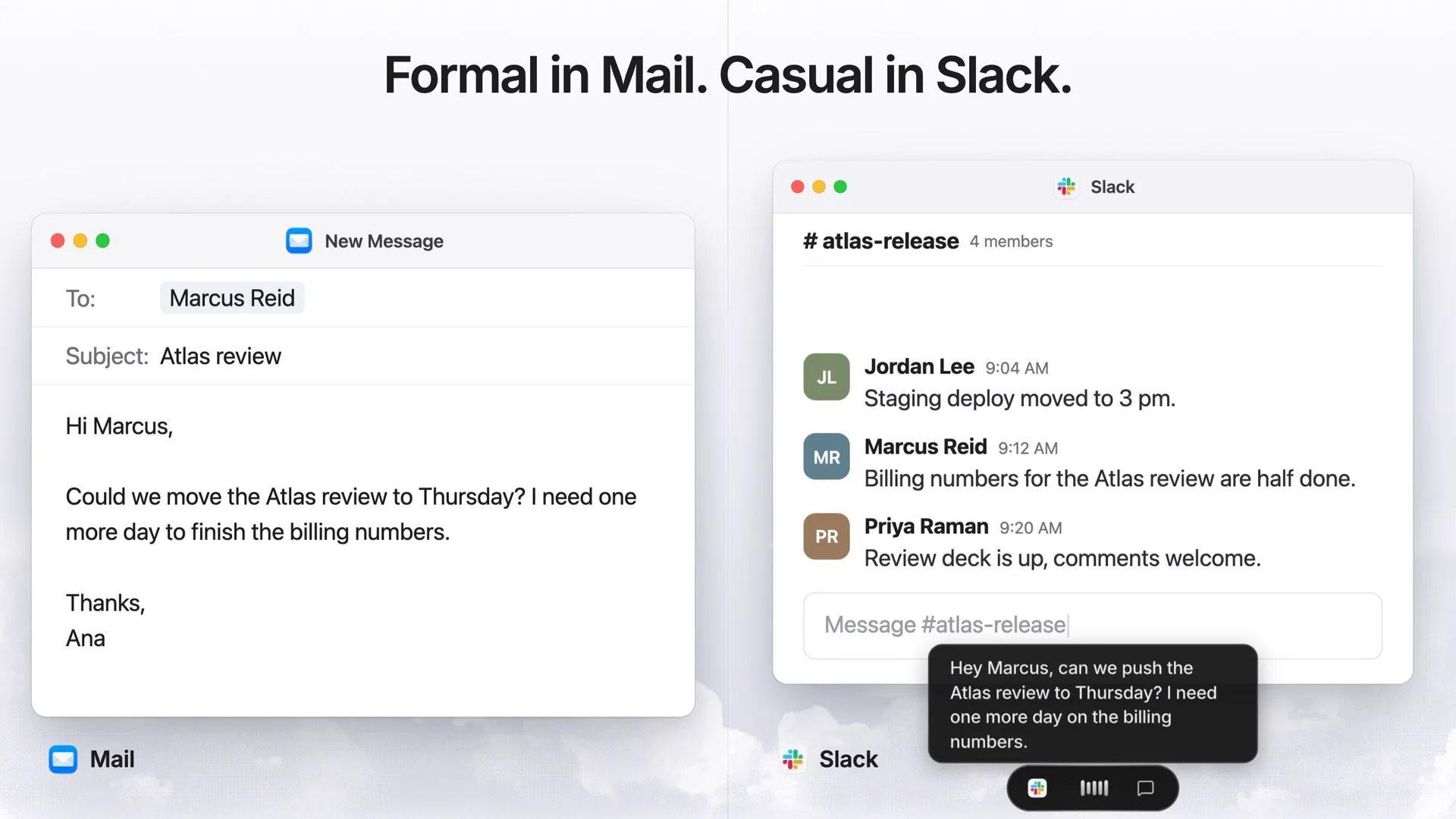
Dictation landing in Mail, tones per app, the terminal, Command Mode rewriting a selection, meeting notes with speaker labels, Live Ask, file transcription and local models, on Mac and Windows. Typing is sooooo slow. Speak. It's written. Formal in Mail. Casual in Slack. Any app. Even your terminal. Select it. Say what to change. Every meeting, written down. Who said what. Then ask it anything. Drop in any file. Export anywhere. Your voice stays on your machine. On Mac and Windows. Vowen, vowen.ai
fnDictation
Hold fn (Ctrl+Shift on Windows) and talk. Free and unlimited: forever, not for 14 days.
Slack, Gmail, Cursor. If it has a cursor, it works.
Your words appear while you are still talking.
Say it once. Each app gets the tone it expects.
Names and jargon, spelled the way you spell them.
Lena Novak 9:12 AM
Dry run moved to 4pm. Same room.
Omar Haddad 9:41 AM
The pricing slide is in the deck now.
Maya Chen 9:44 AM
Are the slides ready for tomorrow?
 Inbox (12) - [email protected] - Fieldnote MailGmailSearch mail
Daniel Okafor
Thursday review
12// Charges the order total once; throws on decline.13export async function chargeCard(order: Order) {14 const res = await payments.charge(order.total);15 if (!res.ok) throw new PaymentError(res);16 return res.id;17}1819export function refund(id: string) {20 return payments.refund(id);21}
almost um I'll send them over by sixtonight with the new pricing slide
hi daniel thursday at ten works forme I'll bring the latest numbers
add a retry with backoff to thepayment call and log every failure
 Q4 planning notes - Google Docs
 Q4 planning notes Share
Monday at 9:30 in the big room. Bring the draft roadmap.
Let's keep the kickoff to 30 minutes and move the budget review to Friday.
let's keep the kickoff to thirty minutesand move the budget review to friday
To: Dana Whitfield
Cc:
Subject: Release
The build is green, so let's merge after lunch.
Sam
 SlackCasual
launch
Omar Haddad 2:14 PM
Is it safe to merge?
build's green, let's merge after lunch
 atlas — claude — 80×24Raw
sam@Mac atlas % claude
* Welcome to Claude Code
cwd: ~/atlas
? for shortcuts
the build is green so lets merge after lunch
Upgrade the cluster to 1.31
Add description...
ActivityLena Novak moved from Todo to In Progress 2h ago
ask priya ramen if the cooper nettiesupgrade is still blocked on super base
⌥⇧Command Mode
Hold Option+Shift (Alt+Shift on Windows) and give an instruction. Tab pastes the result.
Re: Atlas launch - [email protected] - Fieldnote MailAna Lopez <[email protected]>Mon, Oct 1, 4:12 PM
Is the launch still on the 7th? My team has two releases queued for that week.
Ana Lopez
Hi Ana,
The launch has moved to the 14th. Nothing ships before then, and please make sure your team knows today.
Quick heads-up: the launch is now on the 14th, so let's hold new releases until then. Could you let your team know today?
Thanks, Sam
make this friendlier
 Zoom
Zoom Google Meet
 Microsoft TeamsSlack huddles
 Webex
Webex Discord
Meeting notes
Vowen records both sides of the call from your computer. No one has to ask who invited the notetaker.
A call starts and Vowen offers to take notes. Count the participants.
Both sides, live, with speakers worked out on your computer.
Missed something? Ask mid-call. The answer comes from what has been said so far.
Notes from one of 44 templates, with decisions and owners.
Ask what was decided. The answer comes with timestamps.
 Ana Lopez
 Priya Raman
Ana Lopez: Shall we start with the launch date?
Ana LopezPriya RamanAre we still shipping Atlas on the seventh?
Billing hasn't had a dry run yet.
Then let's move it to the fourteenth.Then let's move it to the fourteenth.
I'll book the dry run for Tuesday.I'll book the dry run for Tuesday.
Ana LopezPriya RamanWhat's blocking the launch?
Billing hasn't had a dry run yet. Priya raised it a minute ago.
Wait, did we just move the launch?
Yes. Ana moved it from the 7th to the 14th, so billing gets its dry run first. Priya is booking that for Tuesday.
The team moved the Atlas launch from the 7th to the 14th so billing can get a dry run first. 2:14
Who owns the billing dry run?
Priya Raman. She is booking it for Tuesday.
What did we decide about the date?
Atlas moves from the 7th to the 14th. Priya books the billing dry run for Tuesday first. 2:142:31
What did we decide about the date?
 M4A
M4A MP3
MP3 48:12MP4
 MOVWAV
 12:05WEBM
 OGGM4A
Transcribe files
Voice notes, calls and videos, with speakers and timestamps. Two hours of audio? Give it a few minutes.
MP3, M4A, WAV, MP4, MOV and more, transcribed on your computer.
Who said what, labelled for you and renamed in one place.
TXT, Markdown, PDF, SRT or VTT, ready for subtitles.
Right, let's do this quickly. Where are we on the export bug?
Fixed and merged yesterday. A read-only folder was taking the whole transcript down with it.
So the transcript was actually lost?
It was. Now the transcript is saved first, and the export can fail on its own.
Right, let's do this quickly. Where are we on the export bug?
Fixed and merged yesterday. A read-only folder was taking the whole transcript down with it.
So the transcript was actually lost?
It was. Now the transcript is saved first, and the export can fail on its own.
1
00:00:00,000 --> 00:00:03,100
Right, let's do this quickly. Where are we on the export bug?

2
00:00:03,000 --> 00:00:06,100
Fixed and merged yesterday. A read-only folder was taking the whole transcript down with it.

3
00:00:15,000 --> 00:00:18,100
So the transcript was actually lost?
Small, and used every day.
Ums and uhs never reach the page.
Type a short trigger anywhere. Get the whole thing.
Tap fn and Control (Ctrl+H on Windows) to start, and again to stop. For long thoughts.
On a MacBook the pill can sit in the notch. Everywhere else it floats.
Dictate from the middle button or the side buttons, M4 to M8.
With Pro, your music pauses while you talk and picks up after.
With Pro: iCloud Drive, Google Drive, Dropbox or OneDrive. No Vowen server in between.
vowen mcpDictate into Claude Code or Codex, and let them search your notes through the Vowen MCP server.
QWERTY, AZERTY and QWERTZ, and rarer ones like Dvorak and Colemak too. Set any shortcut and it works on the keyboard you have.
Parakeet, Nemotron and Whisper run on your Mac or PC with no network at all. Cloud speech and AI only run when you add your own key, and the request goes straight to that provider. There is no Vowen cloud in between.
Try it: turn Wi-Fi off.
 ParakeetNVIDIANemotronNVIDIA
 WhisperOpenAI
 Mistral
 Groq
Groq Deepgram
 ElevenLabs
 AssemblyAI
 Soniox
 Speechmatics
 Cartesia
 Sarvam
 xAIOpenAI
 GeminiOpenAI
 AnthropicGeminiGroq
 DeepSeek
 OpenRouter
 Azure OpenAI
 Cerebras
 AWS Bedrock
 Ollama
 LM Studio
Speak the language you think in. Whisper understands 99 languages and works out which one you are using, and Parakeet V3 covers 25 European languages on your device.
 English
 Español
 Français
 Deutsch
 Italiano
 Português
 Nederlands
 Polski
 Svenska
 Norsk
Norsk Dansk
Dansk Suomi
Suomi Čeština
 日本語
日本語 中文
中文 한국어
한국어 हिन्दी
 Bahasa Indonesia
 Tiếng Việt
 ไทย
ไทย Türkçe
 العربية
 עברית
עברית فارسی
فارسی Bahasa Melayu
 Filipino
 Українська
 Ελληνικά
 Română
 Magyar
 Hrvatski
 Slovenčina
 Català
 Kiswahili
 اردو
اردو বাংলা
বাংলা Afrikaans
 Íslenska
 Lietuvių
 Русский
Vowen itself is translated into 18 languages.
No subscription. Ever.
Unlimited, for good.
Nothing sold separately.
One license covers them.
Every future version.
Not for you? Money back.
No cloud minutes to buy.
One app, one license.
From Reddit, LinkedIn, X, Discord and our inbox, quoted as written.
“I ended up completely replacing Whisper Flow with Vowen. It just feels better to use: lightweight, smooth, practical, and built with real attention to user experience.”Email
“Wow, you guys are actually GOATed. I'm pretty blown away by how great the product is and how great you guys as software developers are.”Discord
“Vowen is close to perfect. It's much better than PAID alternatives.”Discord
“I am LOVING the app, and have been telling everyone.”Email
Dictation is free and unlimited, for good. Pro unlocks everything else with one payment, and every update after it.
One Pro license covers three devices, Mac or Windows. Full refund within 14 days.
Paid once. Yours to keep.
Secure checkout by Dodo Payments. 14-day refund.
Everything you need to talk instead of type, on Mac and Windows.
For everyone, for good
macOS 14 or later, or Windows 10 or later.
Something else? Email [email protected] or ask in the Discord.
A voice app for Mac and Windows. Hold a key to dictate into any app, take meeting notes without a bot, transcribe files and run commands by voice. Dictation is free, and Pro is a one-time $49.
Yes. Dictation is free and unlimited, on local models or with your own key for a cloud service. The free plan also includes AI cleanup, an unlimited dictionary, 10 meeting notes up to 5 hours, 10 file transcriptions and 5 Command Mode calls a day.
Yes. You pay $49 once and keep Pro, with every future update included. There is no subscription and nothing renews.
There is no trial, but there is a refund. The free plan lets you try meeting notes, file transcription and Command Mode first. If Pro is not for you, ask within 14 days and you get your money back in full.
Yes. Dictation, file transcription, meeting transcription and speaker labels all run on your computer with local models. AI cleanup, Command Mode and summaries need a language model: a cloud key, or a local one through Ollama or LM Studio.
Only if you choose a cloud model. Local models keep your audio on your computer. If you pick a cloud speech or AI service, Vowen sends the request with your own key, straight to that provider. There is no Vowen server in between.
No. Vowen records your microphone and your computer's audio, so both sides of Zoom, Teams, Meet or any other call are captured without anyone joining. Speaker labels are worked out on your machine.
Yes. Vowen runs on Windows 10 or later (x64) and on macOS 14 or later. One Pro license covers up to three devices, in any mix of Mac and Windows.
OpenAI, Anthropic, Google Gemini, Groq, DeepSeek, OpenRouter, Azure OpenAI, Cerebras and AWS Bedrock, plus any OpenAI-compatible endpoint such as Ollama or LM Studio. AI is optional, and you bring your own key.
Yes. Dictate prompts into Cursor, VS Code, Claude Code or Codex. The Vowen CLI also runs an MCP server, so Claude Code and Codex can search your notes and transcripts.
