
Transcribe your Zoom meetings, automatically
Turn any Zoom call into an accurate, speaker-labeled transcript — capture the meeting live or drop in a saved recording. Private by default, on Mac and Windows.
Free download. No account required.
Zoom's transcript leaves a lot on the table
Zoom's built-in transcription is gated behind paid plans, often misses speaker names, and locks the text inside Zoom's cloud. If you record interviews, client calls, or team meetings, you usually end up with a video file and no easy way to turn it into something searchable.
Vowen handles both paths: it can listen to a live call and produce notes as you go, or transcribe a Zoom recording you already have. Either way you get clean text with speakers identified — and your audio doesn't have to leave your machine.
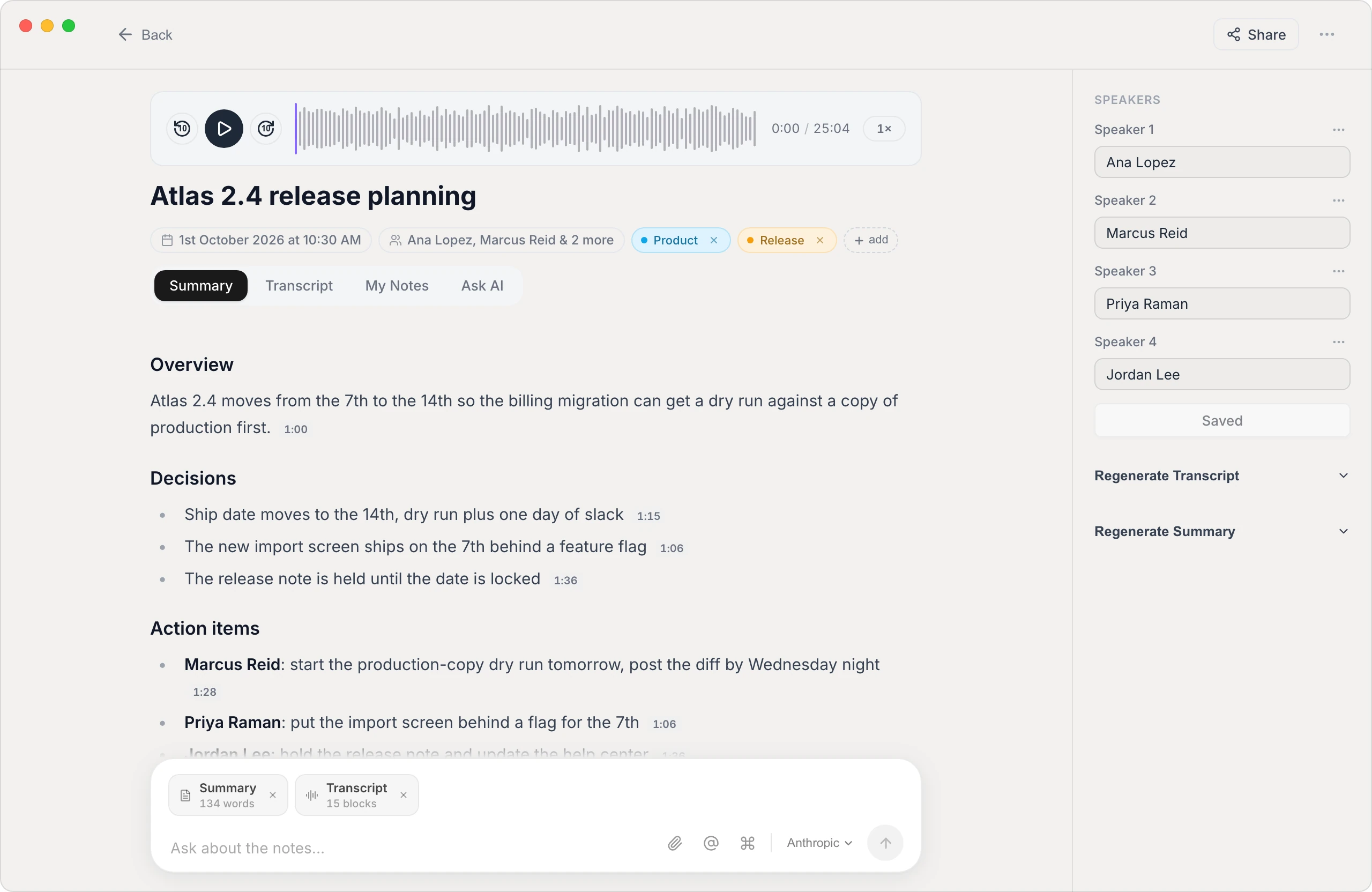
A transcript you can actually use
Speaker labels that stick
Vowen identifies who said what and carries those names through to the summary — not just the raw transcript — so action items are attributed to the right person.
Private by default
Transcription can run entirely on your device. Your meeting audio doesn't have to be uploaded to anyone's cloud unless you choose a cloud model.
Export anywhere
Get your transcript as text, Markdown, PDF, or subtitles (SRT/VTT) — ready to drop into notes, docs, or your knowledge base.
Summaries + action items
Beyond the raw transcript, Vowen can generate a structured summary with decisions and next steps using your own AI provider key.
Two ways to transcribe a Zoom meeting
- 1
Capture it live
Start Vowen's meeting notes before or during the call. It records the conversation and transcribes as you go, so the transcript is ready when the meeting ends.
- 2
Or import a recording
Already have a saved Zoom recording? Drop the video or audio file (MP4, M4A, MP3) into Vowen and it transcribes the whole thing.
- 3
Review & label speakers
Vowen separates speakers automatically; rename them once and the labels flow through the transcript and summary.
- 4
Summarize & export
Generate a summary with key decisions and action items, then export the transcript in the format you need.
Common questions.
Still deciding? Ask us anything.
Do I need a paid Zoom plan to transcribe meetings?
No. Vowen transcribes independently of Zoom — it either listens to the call or processes a recording you've saved — so you don't need Zoom's paid transcription add-on.
Can Vowen transcribe a Zoom recording I already have?
Yes. Drop the saved recording (MP4, M4A, or MP3) into Vowen and it will transcribe the entire file, with speaker labels.
Is my meeting audio uploaded to the cloud?
Not by default. Vowen can transcribe on-device, so your audio stays on your machine. Cloud models are optional and only used if you enable them with your own key.
Does it work on Windows and Mac?
Yes — Vowen runs on both macOS and Windows with the same features, so you can transcribe Zoom calls on either platform.
More in Transcribe.
Transcribe your Microsoft Teams meetings
Turn any Teams call into an accurate, speaker-labeled transcript — capture the meeting live or drop in a saved recording. Private by default, on Mac and Windows.
OpenTranscribe Voice MemosTurn your voice memos into text
Drop any Voice Memos recording into Vowen and get an accurate, editable transcript in seconds — your audio stays on your Mac, no upload required.
OpenTranscribe InterviewsTranscribe interviews with speakers labeled
Turn a recorded interview into an accurate, speaker-separated transcript you can quote, code, and search — privately, on Mac and Windows.
Open
Never lose a Zoom meeting again
Download Vowen free and turn your next call into a clean, searchable transcript.