
Transcribe interviews with speakers labeled
Turn a recorded interview into an accurate, speaker-separated transcript you can quote, code, and search — privately, on Mac and Windows.
Free download. No account required.
Interview audio is hard to work with
An interview is only useful once it's text. Researchers need clean transcripts to code qualitative data, journalists need accurate quotes with attribution, and hiring teams need a record of who said what. Doing it by hand means hours of pausing, rewinding, and typing — and transcription services charge per minute and ask you to upload sensitive recordings to their cloud.
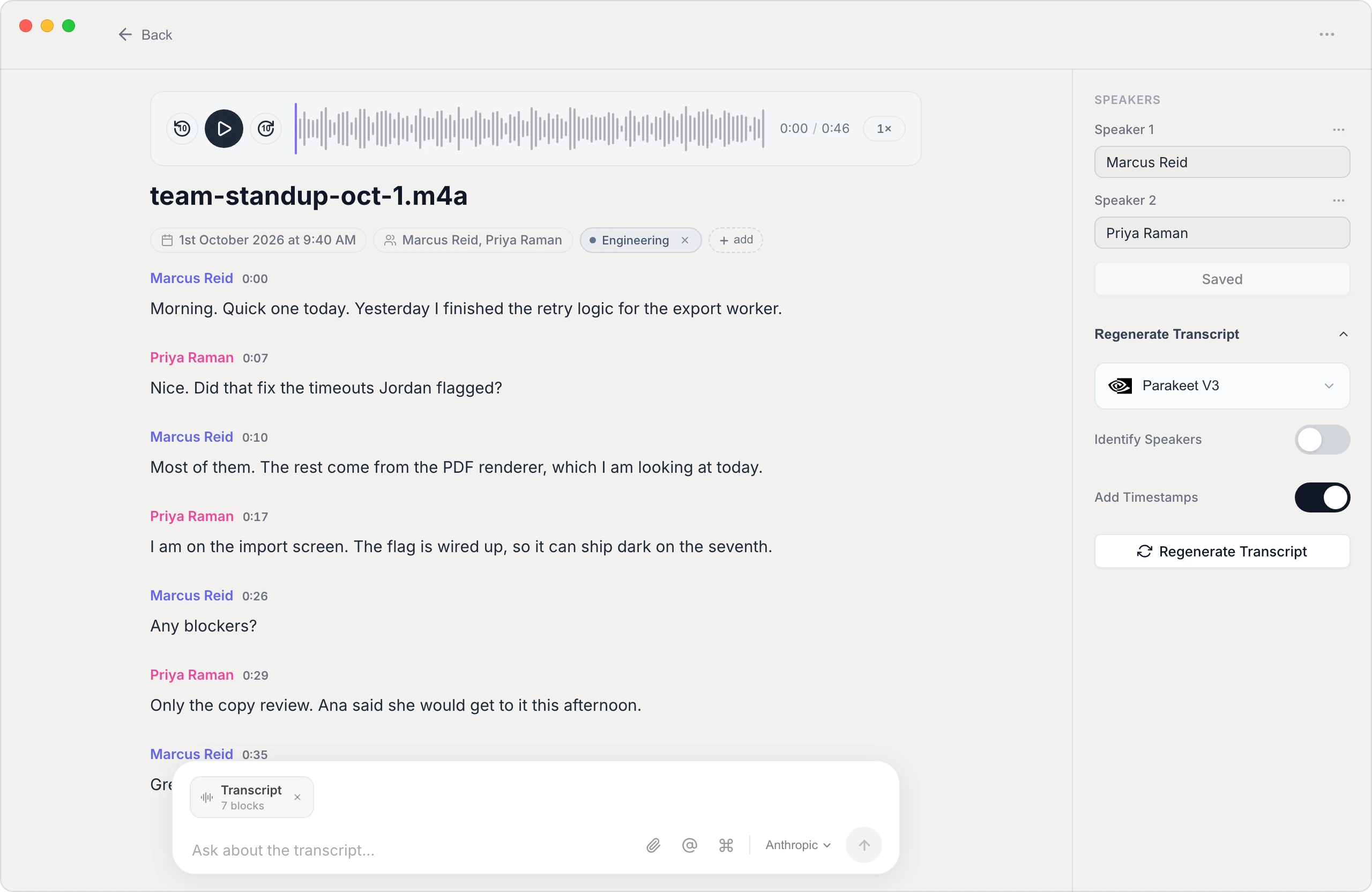
Vowen transcribes the whole interview for you and separates the speakers, so you get a transcript where each person's words are attributed. Drop in a recording you already have, or capture the conversation live. Because it can run on-device, a confidential source or a candidate's interview never has to leave your machine.
Built for transcripts you'll actually quote from
Speaker labels
Vowen separates who's talking and labels each speaker. Rename them once — interviewer, participant, candidate — and the labels carry through the transcript.
Keep sources private
On-device transcription means a sensitive or off-the-record interview never gets uploaded. Your recordings stay on your computer.
Quote and code with confidence
A clean, timestamped, attributed transcript is easy to search, pull quotes from, or import into your qualitative coding workflow.
Export for analysis
Export to text, Markdown, or subtitles so the transcript drops straight into your notes, paper, or analysis tool.
How to transcribe an interview
- 1
Record or import the interview
Capture the conversation live with Vowen, or drop in a recording you already have (MP3, M4A, WAV, or video).
- 2
Let Vowen separate speakers
Vowen transcribes the audio and distinguishes the participants automatically, so the dialogue is already split by speaker.
- 3
Label and correct
Rename the speakers and fix any names or specialized terms — Vowen learns your custom vocabulary to get them right next time.
- 4
Export for analysis
Send the finished transcript to text, Markdown, or subtitles, ready for coding, quoting, or your write-up.
Common questions.
Still deciding? Ask us anything.
Does Vowen label who said what in an interview?
Yes. Vowen separates speakers automatically and lets you rename them, so the transcript attributes each line to the right person.
Can I transcribe a confidential interview privately?
Yes. Vowen can transcribe on-device, so a sensitive interview never leaves your computer. Cloud models are optional and only run if you enable them with your own key.
What recordings can I transcribe?
Vowen handles common audio and video formats — MP3, M4A, WAV, and more — whether you recorded on a phone, a dedicated recorder, or over a video call.
Can it handle accents and specialized terminology?
Yes. You can add a custom vocabulary of names, jargon, and acronyms so Vowen transcribes the terms specific to your field correctly.
More in Transcribe.
Turn lectures into searchable study notes
Transcribe a recorded lecture into accurate, searchable text so you can study from the words instead of re-listening to an hour of audio.
OpenTranscribe PodcastsTranscribe your podcast, episode by episode
Turn each episode into an accurate, speaker-labeled transcript you can mine for show notes, quotes, and blog posts — processed on your own machine.
OpenTranscribe SermonsTurn your sermons into a searchable archive
Transcribe each message into accurate text for your website, devotionals, and members who'd rather read than re-listen — processed privately on your own machine.
Open
Turn your next interview into a transcript
Download Vowen free and get accurate, speaker-labeled interview transcripts — privately.