
From meeting to minutes, without typing through it
Vowen records the meeting, transcribes it on your own computer with every speaker labeled, and drafts a structured summary — decisions, action items, who said what — that you review and turn into the official minutes. On Mac and Windows, with a one-time price.
Runs in the Vowen desktop app, on your Mac or PC, not in the browser. Free to download, no account. Looking for something to try right here? Test your microphone.
Taking minutes means missing the meeting
Whoever takes the minutes barely gets to participate: they spend the meeting typing, then another hour afterwards reconstructing what was decided, who owns which action, and what exactly the wording of that motion was. The usual software fix — a cloud notetaker — sends a bot into the call and your organization's most sensitive discussions onto someone else's servers, on a per-seat subscription.
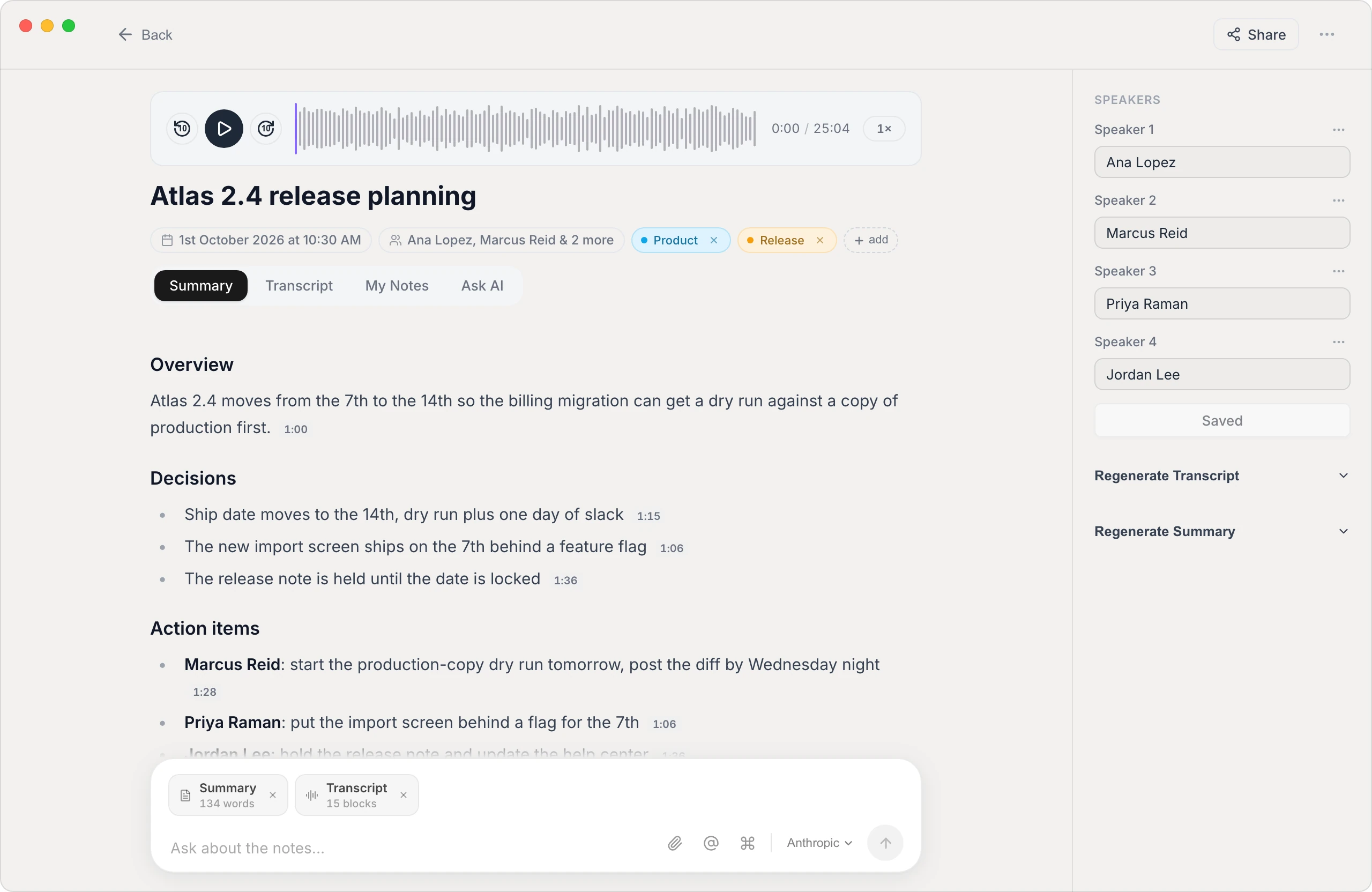
Vowen takes a different approach. It runs on the minute-taker's computer, detects when a meeting starts, and records and transcribes locally — no bot joins the call, and the audio never has to leave the machine. When the meeting ends you have a speaker-labeled transcript and a structured draft: what was discussed, what was decided, and the action items with owners. You edit, approve, and file the minutes — with a verbatim record to check every time wording matters.
Built for the person holding the pen
Minutes stay in the room
Transcription runs on-device, so board discussions, personnel matters, and client-confidential meetings aren't uploaded to a transcription vendor's cloud. There's no bot participant, either — nothing joins your call.
Speaker labels for attribution
Vowen identifies who said what and carries names through transcript and summary — so "moved by", "seconded by", and "agreed to own it" are attributed to the right person, not reconstructed from memory.
A minutes-shaped draft, automatically
Custom summary templates let you define the exact structure your minutes follow — attendees, agenda items, decisions, action items — and every meeting comes out in that shape, ready for review.
Export and distribute
Export minutes as text, Markdown, or PDF, sync them to an Obsidian vault, or post finished notes to Slack, Notion, or any webhook the moment the meeting ends.
Ask the meeting afterwards
Every recorded meeting is searchable and chattable — ask what was decided about the budget line, surface an exact quote, or pull the follow-ups without rereading the whole transcript.
One-time price, no per-seat billing
Minute-taking is usually one person's job — so you don't need a per-seat cloud subscription for the whole committee. Vowen Pro is a one-time purchase, and there's a perpetual free tier to start with.
How minutes get made with Vowen
- 1
Start recording
Vowen detects the call and offers to record, or you start it manually — it captures the meeting from your computer, in-room or remote, with no bot joining.
- 2
Let the meeting happen
Participate normally. Vowen transcribes as it goes and separates the speakers; rename them once and the labels stick across transcript and summary.
- 3
Review the draft
When the meeting ends you get a structured summary in your template — discussion points, decisions, action items with owners — plus the full transcript to verify exact wording.
- 4
Finalize and file
Edit the draft into the official minutes, then export to PDF or Markdown, sync to Obsidian, or send them to Slack or Notion automatically.
Worth knowing
What Vowen does and doesn't do
Vowen produces the record and the draft — a speaker-labeled transcript plus a structured summary in your format. It doesn't replace the minute-taker's judgment: formal minutes (motions, votes, approvals) still need a human to finalize them, and that's by design — minutes are a legal record in many organizations. Also record responsibly: get the meeting's consent, and for executive or closed sessions follow your bylaws and counsel on whether recording is appropriate at all.
Common questions.
Still deciding? Ask us anything.
Is this a cloud service? Where does the audio go?
Vowen is a desktop app for Mac and Windows, and transcription runs on your device by default — meeting audio stays on the minute-taker's computer rather than being uploaded to a vendor's cloud. Optional AI summarization can use your own API key, in which case only the transcribed text is sent to the provider you choose.
Does a bot join the meeting?
No. Vowen records from your computer — it captures the meeting audio locally, so nothing appears in the participant list. That also means it works the same across Zoom, Teams, Google Meet, Webex, or an in-room meeting with your laptop on the table.
Can it produce formal minutes automatically?
It produces a strong draft: a structured summary in a template you define — attendees, agenda items, decisions, action items with owners — backed by a speaker-labeled verbatim transcript. A person still reviews and finalizes the official minutes, which is how it should be for anything that gets approved or filed.
Does it work for in-person meetings?
Yes. Record the room from your laptop's microphone, or import an audio or video file recorded on another device (MP3, M4A, WAV, MP4) and Vowen transcribes it with speaker labels.
How is this different from Otter or Fireflies?
Cloud notetakers process meetings on their servers, usually via a visible bot participant, on a per-seat subscription. Vowen processes on-device with no bot, and is a one-time purchase. The trade-off is honest: cloud tools offer team workspaces and cross-team search; Vowen is built for the person who actually produces the minutes and wants the recording kept local.
More in Tools.
Record every meeting — without a bot in the room
Vowen records meetings from your own computer: your microphone and the other participants' audio, on Zoom, Teams, Google Meet, Webex, or across the table. You get the recording to replay, a speaker-labeled transcript, and a structured summary — processed on-device, stored locally, with nothing joining the call.
OpenAudio to SRTTurn audio into an SRT file on your own computer
Drop in an audio or video file and get a properly timed .srt or .vtt subtitle file — transcribed on-device, split into caption-sized lines, and free to export. No upload, no watermark, no per-minute meter.
OpenAudio to textTranscribe audio to text in minutes
Drop in any recording and get a clean, accurate transcript you can edit, search, and export. Processed on your device by default — free to start on Mac and Windows.
Open
Take real minutes without leaving the conversation
Download Vowen free and let your next meeting arrive as a speaker-labeled transcript with a minutes-ready draft.