
Transcribe audio to text in minutes
Drop in any recording and get a clean, accurate transcript you can edit, search, and export. Processed on your device by default — free to start on Mac and Windows.
Runs in the Vowen desktop app, on your Mac or PC, not in the browser. Free to download, no account. Looking for something to try right here? Test your microphone.
Most audio-to-text tools cap, watermark, or upload your files
Free online converters usually limit you to a few minutes, gate exports behind a paywall, and send your audio to someone else's server. For interviews, lectures, or anything sensitive, that's a non-starter.
Vowen transcribes your files locally using on-device models, with no per-minute caps for local processing. You drag in a file, get the text, edit it inline, and export it however you need — without your audio leaving your computer.
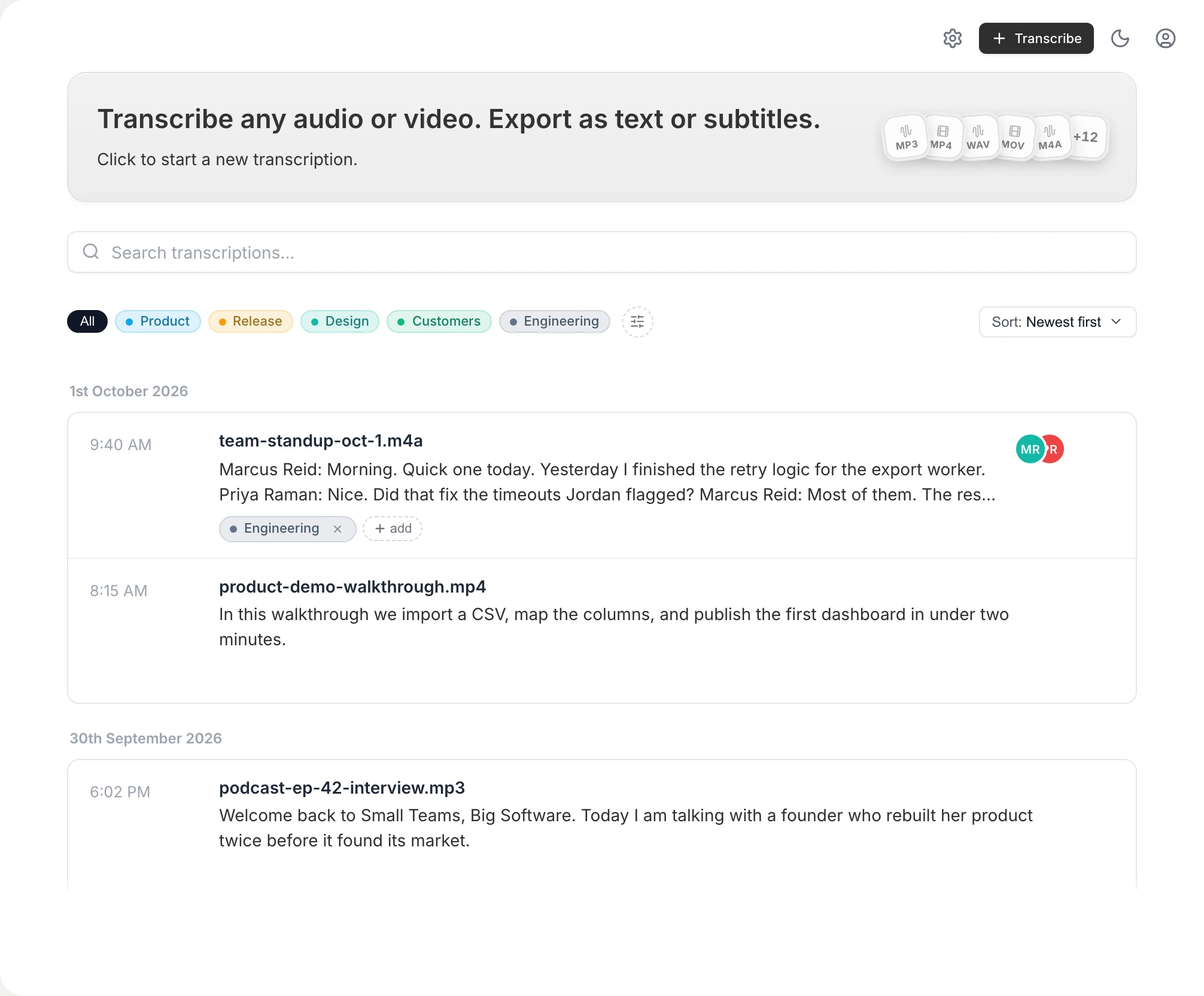
Built for real files, not demos
Any common format
MP3, WAV, M4A, MP4, MOV and more — drop the file in and Vowen handles the rest, including long recordings.
On-device by default
Local transcription means your audio stays on your machine. Cloud models are optional and only used if you turn them on.
Edit and export
Fix any word inline, then export as text, Markdown, PDF, or subtitles (SRT/VTT) for video.
99 languages
Transcribe recordings in 99 languages, with optional translation.
How to convert audio to text
- 1
Download Vowen
Install the free app for macOS or Windows. No account required to get started.
- 2
Drop in your audio file
Drag any MP3, WAV, M4A, or MP4 into Vowen's transcription view.
- 3
Get your transcript
Vowen transcribes the file on-device and shows the text with timestamps.
- 4
Edit and export
Clean up anything that needs it, then export to text, Markdown, PDF, or subtitles.
Common questions.
Still deciding? Ask us anything.
Is there a time limit on transcription?
Local transcription isn't metered per minute the way most free web tools are, so a long recording counts as one file, not a pile of minutes. The free plan includes 10 file transcriptions; Pro makes them unlimited.
Are my audio files uploaded anywhere?
Not by default. Vowen transcribes on-device, so your files stay on your computer. Cloud models are optional and only used if you enable them with your own key.
What audio and video formats are supported?
Common formats including MP3, WAV, M4A, MP4, and MOV. You can drop in audio or video — Vowen extracts and transcribes the speech.
Can I export subtitles?
Yes. Alongside plain text, Markdown, and PDF, Vowen can export SRT and VTT subtitle files for use with video.
More in Tools.
Convert M4A audio to text
Got an .m4a file? Drop it into Vowen and get an accurate, editable transcript — no format conversion, no upload, free to start on Mac and Windows.
OpenMP3 to textConvert MP3 audio to text
Got an .mp3 file? Drop it into Vowen and get an accurate, editable transcript — no upload, no per-minute caps, free to start on Mac and Windows.
OpenWAV to textConvert WAV audio to text
Got a .wav file? Drop it into Vowen and get an accurate, editable transcript — no upload, no per-minute caps, free to start on Mac and Windows.
Open
Turn your audio into text now
Download Vowen free and transcribe your first file in minutes — local processing is free, with 10 file transcriptions on the free plan and unlimited on Pro.