
Speech to text that works with the Wi-Fi off
Vowen transcribes on-device by default: your voice is processed locally on your Mac or PC, not on someone's server. Dictate on a plane, in the field, or on a locked-down network — and keep sensitive audio on your machine, always.
Free download. No account required.
Most 'speech to text' is really 'upload your voice'
The majority of dictation and transcription tools are cloud services in disguise: your audio is recorded, sent to a server, transcribed there, and sent back. That means they stop working the moment your connection drops, add network lag to every sentence, meter you with per-minute quotas — and everything you say passes through infrastructure you don't control. For confidential work, client calls, or anywhere with no signal, that's a non-starter.
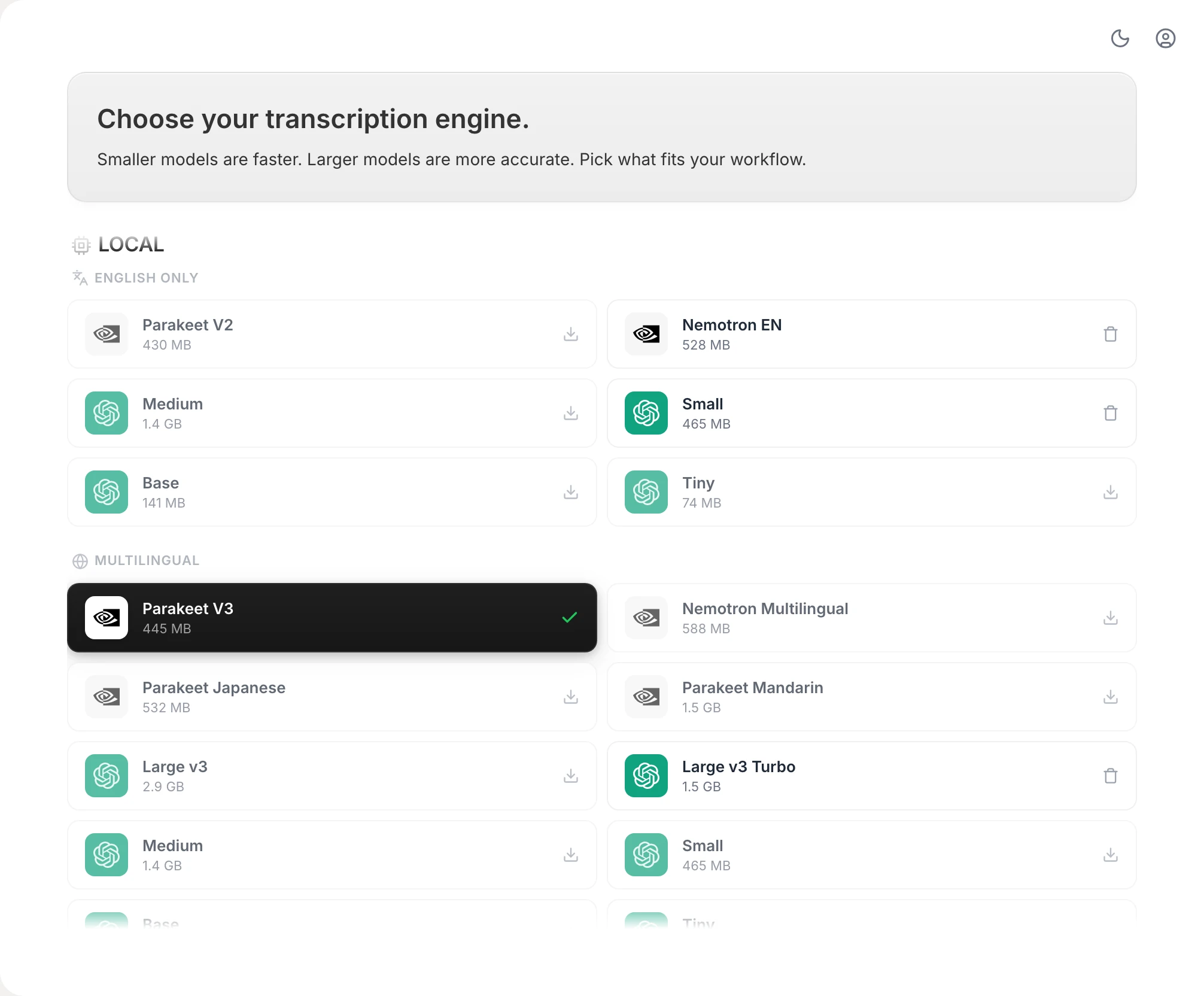
Vowen is built the other way around. Speech recognition runs locally, on your computer's own hardware, using fast on-device models. Once the app and a model are installed, transcription needs no connection at all: dictation types into any app, and audio files transcribe without ever being uploaded. Cloud models exist as an option — but they're exactly that, an option you switch on, not the default you can't escape.
What truly local speech to text gets you
Audio never has to leave your machine
On-device transcription means the voice recording itself isn't uploaded anywhere — a straightforward privacy story for confidential dictation, client work, and regulated environments.
Works where the internet doesn't
Planes, trains, field sites, hospital basements, air-gapped and locked-down networks: once the model is downloaded, transcription doesn't care whether you're online.
No network lag, no per-minute meter
Local processing removes the round-trip to a server, so text appears as you speak — and there's no per-minute billing or monthly quota counting your words.
System-wide, in every app
A global hotkey dictates into any text field on macOS or Windows — notes, email, your editor, your EHR — with no per-app setup.
Custom vocabulary, kept locally
Teach Vowen your names, acronyms, and jargon and it remembers them — your dictionary lives on your machine along with everything else.
AI cleanup — cloud optional, local possible
Optional AI cleanup polishes raw speech into finished text. Use your own cloud API key, or point Vowen at a local LLM server on your machine for a fully offline pipeline.
Set up offline speech to text
- 1
Download Vowen
Install the free app on macOS (14.0+) or Windows (10/11). You'll need a connection for this part — it's the last time you strictly need one.
- 2
Pick an on-device model
Choose a local speech model in settings. It downloads once and lives on your machine from then on.
- 3
Go offline and dictate
Turn off Wi-Fi if you like. Put your cursor anywhere, press your hotkey, and speak — transcription runs entirely locally.
- 4
Transcribe files locally too
Drop in audio recordings and Vowen transcribes them on-device — no upload, no file-size or per-minute caps.
Worth knowing
What 'offline' means here, honestly
You need internet once — to download the app and your chosen on-device model. After that, dictation and file transcription run fully offline. Optional extras that call external services (cloud speech models, cloud AI cleanup with your API key) do need a connection when you use them — but they're off by default, and AI cleanup can also run against a local LLM server on your own machine instead.
Common questions.
Still deciding? Ask us anything.
Does Vowen really work without internet?
Yes. Transcription uses on-device models by default, so once the app and a model are downloaded, dictation and file transcription run with no connection at all. You can dictate with Wi-Fi turned off.
Is offline speech to text less accurate than cloud?
Modern on-device models are strong enough for real work — Vowen's local models handle long-form dictation, accents, and custom vocabulary well. Cloud models are available as an option if you ever want them, but they're not required.
Is anything uploaded at all?
Not for transcription — audio is processed locally and stays on your machine. Optional AI cleanup sends only the transcribed text to the AI provider you configure, and only if you enable it; you can also point it at a local LLM so even that step stays on-device.
Can I use it on a corporate or air-gapped network?
Local transcription makes Vowen a good fit for restricted environments — there's no required cloud dependency for dictation. For fully air-gapped machines, install the app and model first, then move the machine off-network; check with your IT policy as usual.
Does offline mode cost extra?
No — on-device transcription is the default and core dictation is free. Pro is a one-time upgrade for advanced features, not a subscription, and there's no per-minute billing either way.
More in Voice to text.
Voice to text on Mac that works everywhere
Press a hotkey and dictate into any app on your Mac — notes, email, Slack, your editor. Fast, private, on-device transcription with AI cleanup and your own vocabulary.
OpenDictation · WindowsWindows dictation that works everywhere
Press a hotkey and dictate into any app on Windows — Word, Outlook, your browser, Slack, your editor. Fast, private, on-device transcription with AI cleanup and your own vocabulary.
Open
Take your dictation off the grid
Download Vowen free and get private, on-device speech to text on Mac or Windows.