Good meeting notes come down to one thing: a consistent structure you fill in every time, so decisions and next steps never slip through. Below is a clean meeting notes template you can copy today, plus tailored versions for standups, 1:1s, and client calls — and a faster way to fill them in by having the meeting transcribed and summarized for you.
The basic meeting notes template
This is the one to reach for in almost any meeting. Copy it into your notes app and reuse it:
Meeting: [Title]
Date: [YYYY-MM-DD]    Time: [start–end]
Attendees: [names]

Purpose
- [Why are we meeting?]

Agenda
1. [Topic]
2. [Topic]

Discussion / Key Points
- [Point]
- [Point]

Decisions
- [What was decided]

Action Items
- [ ] [Task] — Owner: [name] — Due: [date]
- [ ] [Task] — Owner: [name] — Due: [date]

Next Meeting: [date / "TBD"]
The two sections that matter most are Decisions and Action Items. Discussion notes are useful context, but a meeting that produced no recorded decisions or owned next steps is a meeting you'll repeat.
The anatomy of notes that actually get used
- Header (who/when). Date, attendees, and purpose. Future you needs to know which meeting this was and who was in the room.
- Discussion points. Brief bullets, not a transcript. Capture the substance of each topic, not every sentence.
- Decisions. State outcomes explicitly: "Decided to ship Friday," not "talked about timing." This is the record people come back to.
- Action items with an owner and a due date. A task with no name attached is a task nobody does. Every action gets one owner and a date.
Template variations by meeting type
Daily standup
Standup — [Date]

Per person:
- Yesterday: [done]
- Today: [plan]
- Blockers: [if any]

Blockers to resolve
- [ ] [Blocker] — Owner: [name]
1:1 meeting
1:1 — [Manager] & [Report] — [Date]

Wins since last time
- [Win]

Discussion
- [Topic raised by report]
- [Topic raised by manager]

Feedback
- [Given / received]

Action Items
- [ ] [Task] — Owner: [name] — Due: [date]

Follow up next time
- [Carryover topic]
Client / external call
Client Call — [Client] — [Date]
Attendees: [your side] / [client side]

Goals for the call
- [Goal]

Discussion & requests
- [What the client asked for]

Decisions & commitments
- [What we committed to]

Action Items
- [ ] [Task] — Owner: [name] — Due: [date]

Next steps & follow-up date
- [Date / next touchpoint]
Meeting notes vs. meeting minutes
If you've seen the term "minutes," it's worth knowing the difference. Minutes are a formal, often legally required record of exactly what happened — standard for boards and official bodies. Notes are a lighter, practical summary built around decisions and action items. Most teams want notes; reserve full minutes for meetings that genuinely require an official record.
Stop typing them: auto-generate notes from the conversation
Filling a template by hand has a built-in problem — you can either participate in the meeting or take thorough notes, but doing both well at once is hard. The fix is to let the meeting itself produce the notes.
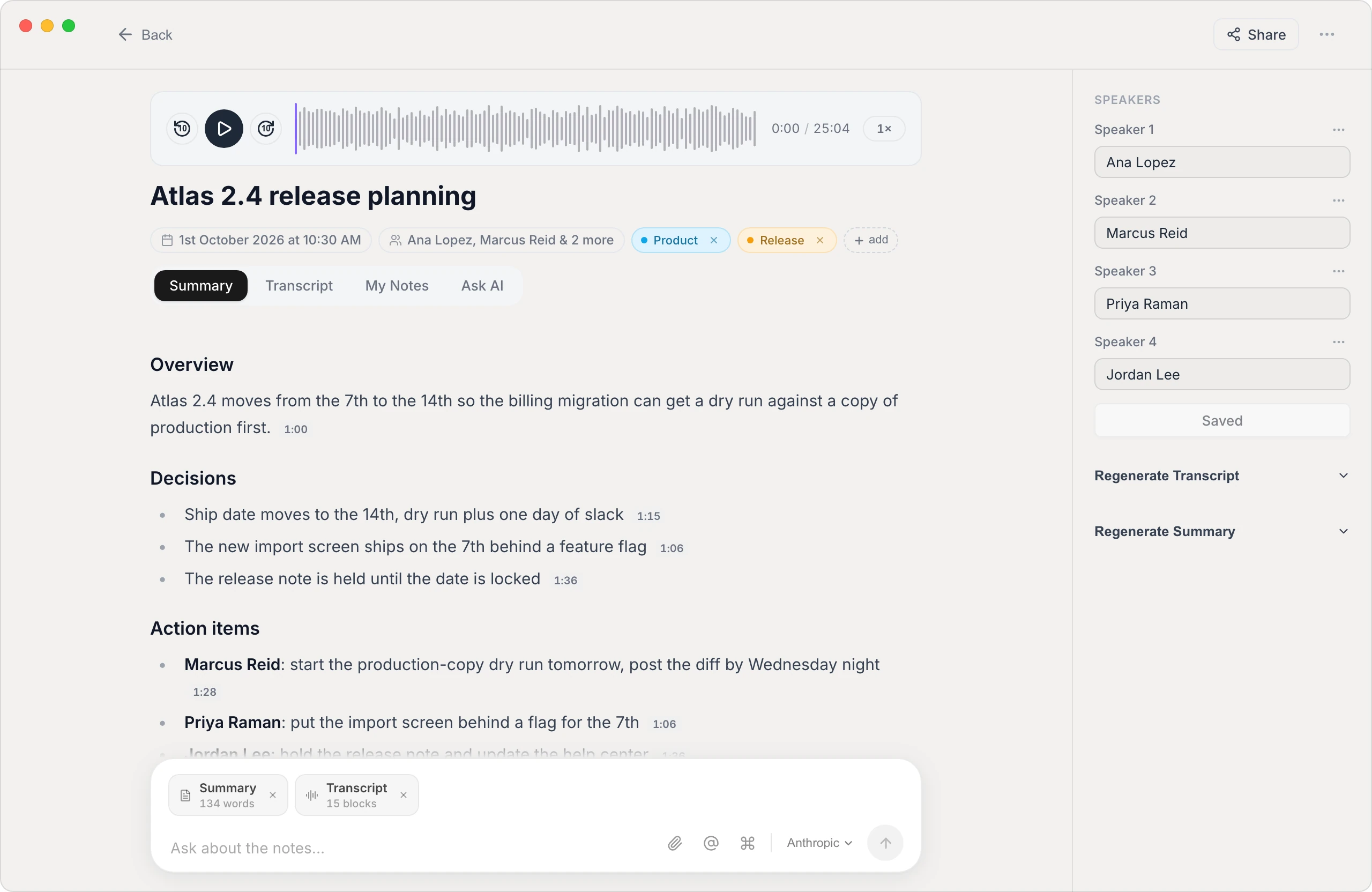
Vowen can capture a meeting, transcribe it with the speakers labeled, and then generate a structured summary — key points, decisions, and action items — that maps onto a template like the one above. You go from a recording to a tidy set of notes you only have to review and clean up, instead of typing from scratch while trying to stay in the conversation. And because transcription can run on your own device, a sensitive client or internal call doesn't have to be uploaded to anyone's cloud.
- Speaker-labeled transcript. Know who said what, so action items get attributed to the right person.
- Structured summary. Decisions and next steps pulled out automatically, not buried in a wall of text.
- Private by default. On-device processing keeps the recording on your machine.
The bottom line
A reusable meeting notes template is the cheapest productivity upgrade there is: it guarantees you always capture decisions and owned action items. Start with the basic template above, adapt it per meeting type, and when you're tired of typing notes while half-listening, let Vowen generate them from the conversation — it's free to download on Mac and Windows.
See it in Vowen
Frequently asked questions
What should a meeting notes template include?
A solid meeting notes template includes the date and attendees, the agenda or purpose, key discussion points, decisions made, and a clearly separated list of action items with an owner and due date for each. The action items are the part that turns notes into follow-through.
What is the difference between meeting notes and meeting minutes?
Meeting minutes are a formal, often required record of exactly what happened — used for boards and official bodies. Meeting notes are a lighter, practical summary focused on decisions and action items. Most teams want notes, not minutes.
Can meeting notes be generated automatically?
Yes. Tools that transcribe the conversation can then produce a structured summary — decisions, action items, and key points — filling in a template for you. You review and tidy it instead of typing from scratch.
How do I take good meeting notes without missing things?
Use a consistent template so you always capture the same sections, focus on decisions and action items rather than transcribing every word, and assign an owner to each task. Recording and transcribing the meeting removes the pressure of catching everything live.
Talk instead of type.
Vowen is voice-to-text that works in any app, on Mac and Windows. Dictation is free and unlimited, no account required.