Good meeting minutes answer three questions for someone who wasn't there: what was decided, who is doing what, and by when. Everything else — the back-and-forth, the tangents, who said what in which order — is optional at best and noise at worst. This guide covers what to capture, what to skip, a copy-paste example, and how to get a solid first draft written for you automatically.
Minutes vs. notes: know which one you're writing
Meeting minutes are the official record of a meeting: structured, shared with the group, and archived. Boards, committees, and nonprofits are often legally required to keep them. Meeting notes are informal — whatever helps you do your job after the call. If you just need a lightweight structure for everyday team calls, start from a meeting notes template instead; this guide focuses on proper minutes.
What to include in meeting minutes
- The basics: meeting name, date, time, location or call link, and who wrote the minutes.
- Attendance: who was present, who was absent, and any guests. For formal meetings, note whether quorum was met.
- Approval of previous minutes: formal bodies vote to accept the last meeting's minutes — record the outcome.
- Each agenda item and its outcome: one short paragraph per item summarizing the conclusion, not the discussion.
- Decisions and votes: for boards, record the motion verbatim, who moved and seconded it, and the vote count. This is the part with legal weight.
- Action items: each with an owner and a due date. An action item without both is a wish, not a record.
- Next meeting: date, time, and any items carried over.
Before the meeting: set yourself up
Minutes are 80% prepared before anyone speaks. Get the agenda in advance and turn it into your skeleton — one heading per item with space for the outcome. Pre-fill the attendee list so you're checking names off, not typing them mid-discussion. If the meeting will be recorded or transcribed, confirm that up front and tell attendees.
During the meeting: capture outcomes, not conversation
The classic minute-taker mistake is trying to write everything down and missing the decision while transcribing the debate. Instead:
- Write decisions the moment they land. When the group agrees, capture the exact wording — read it back if there's any ambiguity. "So we're agreeing to X by Y — correct?" is the minute-taker's most useful sentence.
- Log action items in owner-verb-deadline form. "Priya to send the revised budget by Friday" — not "budget discussed."
- Summarize discussion in one or two lines per item. Note the options considered and the reasoning for the choice, without attributing every remark.
- Stay neutral. Minutes record what happened, not your view of it. Avoid adjectives like "heated" or "excellent" — they don't belong in an official record.
After the meeting: finish while it's fresh
Clean up your skeleton into full minutes within 24 hours. Check every action item has an owner and date, get sign-off from the chair if your organization requires it, then distribute to all attendees and file the minutes where the group archives them. At the next meeting, they'll be approved (and corrected if needed) — that approval is what makes them the official record.
A copy-paste example
Marketing Committee — Monthly Meeting
Date: July 2, 2026, 10:00–10:45 am
Present: A. Chen (chair), J. Alvarez, P. Nair, S. Okafor
Absent: R. Diaz | Minutes by: P. Nair

1. Approval of June minutes — Approved unanimously.

2. Q3 campaign budget
   Discussion: Two options reviewed (expand paid search vs.
   sponsorships). Paid search chosen for measurability.
   DECISION: Allocate $40k to paid search for Q3.
   Motion: J. Alvarez. Second: S. Okafor. Vote: 4–0.

3. Website refresh
   Vendor shortlist reviewed; no decision yet.
   ACTION: S. Okafor to circulate vendor scores by July 9.

4. Next meeting: August 6, 2026, 10:00 am.
Or let the first draft write itself
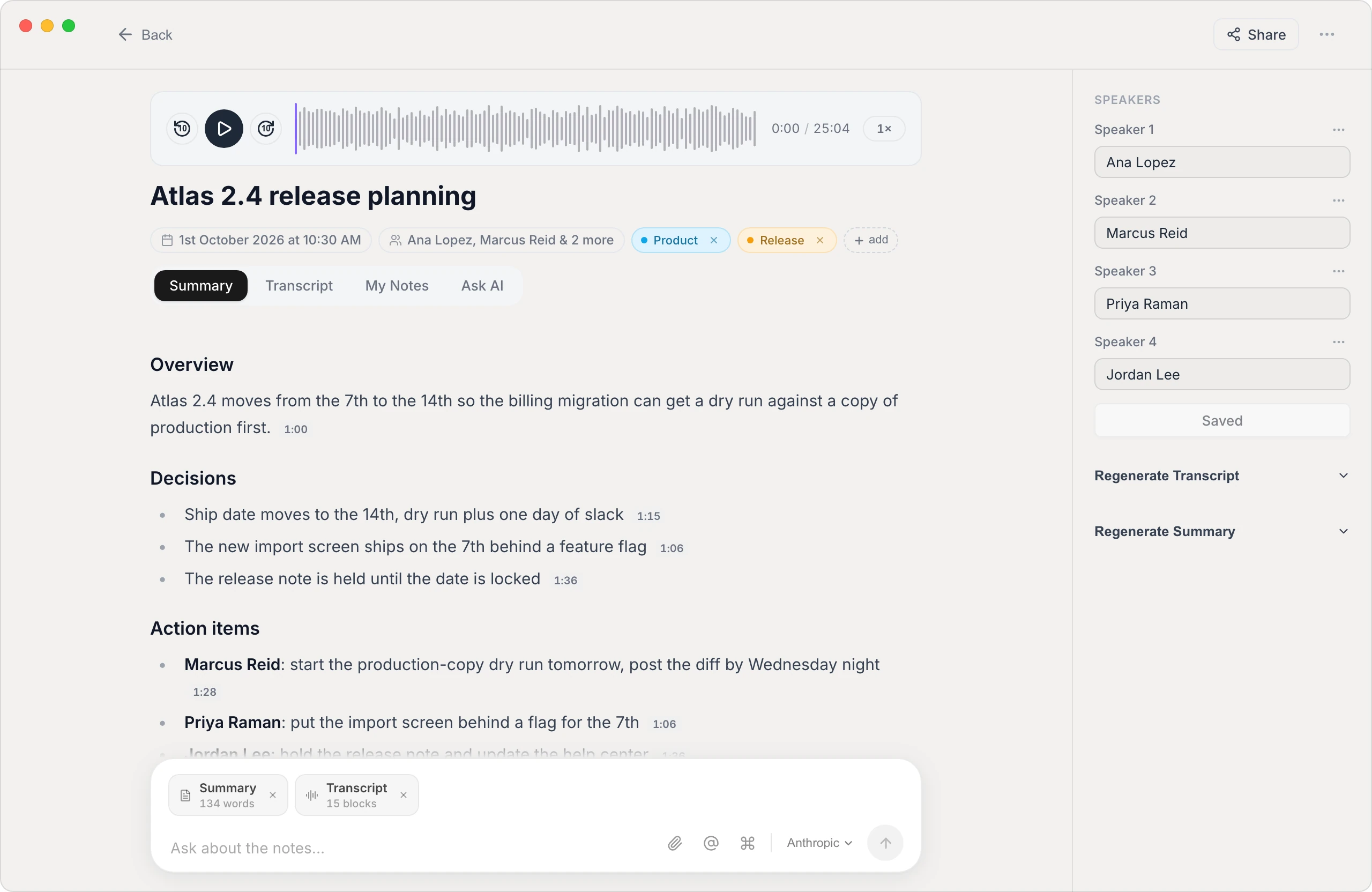
The hardest part of minute-taking is doing two jobs at once: participating in the meeting and documenting it. That's the part worth automating. Vowen records the meeting on your computer — no bot joining the call — transcribes it with speaker labels, and generates a structured summary with the decisions and action items already pulled out. You review, tidy it into your minutes format, and send. The recording and transcript can stay entirely on your device, which matters when board discussions are confidential.
You still apply judgment — approving the exact wording of motions is the minute-taker's job, not the software's — but you're editing a complete, attributed draft instead of reconstructing 45 minutes from scribbles. See how it compares to other tools in our AI note taker roundup, or check pricing (there's a free tier). If you write your minutes by voice, Vowen also does system-wide dictation on Mac and Windows.
The bottom line
Write minutes for the person who wasn't there: decisions, owners, deadlines, and votes, in a consistent structure, sent within a day. Skip the play-by-play. Prepare the skeleton before the meeting, capture outcomes as they happen, and let an on-device tool handle the raw transcript so you can actually participate in the room you're documenting.
See it in Vowen
Frequently asked questions
What should meeting minutes include?
At minimum: the meeting name, date and time, attendees (and absentees), each agenda item with the decision reached, action items with an owner and a due date, and the date of the next meeting. Formal board minutes also record motions — who made them, who seconded, and the result of the vote.
What's the difference between meeting minutes and meeting notes?
Minutes are the official, structured record of a meeting — decisions, votes, and action items — often required for boards and committees. Notes are informal and personal: whatever helps you remember the discussion. Minutes are written for the group and archived; notes are usually written for yourself.
Should meeting minutes be word-for-word?
No. Minutes summarize outcomes, not conversation. Record what was decided, who is responsible for what, and any votes — not who argued which point. A verbatim transcript is a different document, and tools can generate one automatically if you need the full record too.
How soon after a meeting should minutes be sent?
Within 24 hours, while the discussion is fresh and before action items go stale. Faster is better: minutes sent a week later get skimmed or ignored, and disputed recollections are harder to resolve.
Talk instead of type.
Vowen is voice-to-text that works in any app, on Mac and Windows. Dictation is free and unlimited, no account required.