
Turn focus group recordings into analysis-ready transcripts
Transcribe a full session into clean, speaker-labeled text you can code, quote, and search — processed privately on your own machine, on Mac and Windows.
Free download. No account required.
Focus groups are the hardest recordings to transcribe
A focus group isn't one voice — it's a moderator and half a dozen participants agreeing, interrupting, and talking over each other for ninety minutes. Transcribing that by hand takes many hours per session, and outsourcing it means per-minute fees across an entire study and handing participant recordings to a third party — exactly what your consent forms promised you wouldn't do casually.
Vowen transcribes the whole session on your own computer, separates the speakers, and gives you clean text you can drop into your analysis workflow. Recordings stay on your machine, quotes stay attributable, and the transcript is ready the same day you run the group.
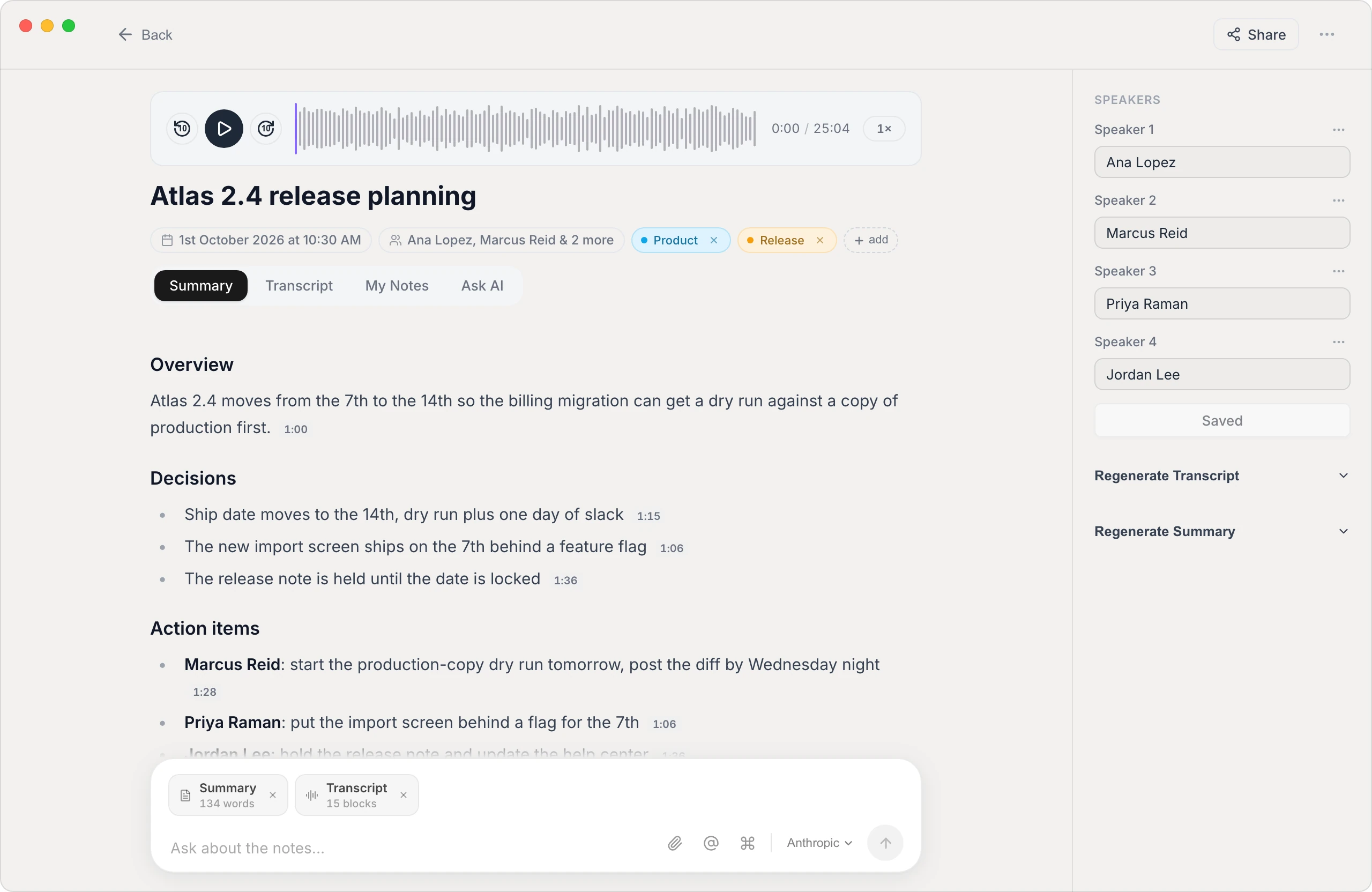
Built for multi-speaker research audio
Speaker separation
Vowen distinguishes who said what — you can even tell it how many people were in the room — so a lively eight-person discussion becomes an attributed, line-by-line transcript.
Participant privacy by default
On-device transcription means session recordings never have to leave your computer — an easier story for consent forms, ethics reviews, and confidential client studies than uploading audio to a service.
Ready for coding & analysis
Export plain text or Markdown that imports cleanly into NVivo, ATLAS.ti, MAXQDA, Dedoose, or a spreadsheet — with speaker labels preserved for quoting.
Custom vocabulary
Teach Vowen the product names, brand terms, and jargon your participants will use so recurring study-specific terms come out right across every session.
How to transcribe a focus group
- 1
Add the session recording
Drop in the audio or video of the session — MP3, WAV, M4A, or a video file. Vowen handles long recordings, so a full 90-minute group processes in one pass.
- 2
Set the speaker count
Tell Vowen how many people were in the room and it separates the voices, so the moderator and each participant get their own label.
- 3
Name the speakers
Rename the labels once — 'Moderator', 'P1', 'P2', or pseudonyms per your consent protocol — and they flow through the whole transcript.
- 4
Export for analysis
Export to text or Markdown and pull the transcript into your QDA software, coding sheet, or report.
Worth knowing
A note on cross-talk
No automatic transcription is perfect when several people speak at once. Vowen's speaker separation works best when participants mostly take turns; expect to review the heaviest cross-talk passages by hand — still a fraction of the time of transcribing the session from scratch.
Common questions.
Still deciding? Ask us anything.
Can Vowen tell focus group participants apart?
Yes. Vowen separates speakers automatically, and you can specify how many speakers were in the session to improve the grouping. You then rename each label — for example to 'Moderator' and participant pseudonyms — and the names apply across the transcript.
Are participant recordings kept confidential?
Yes. Vowen can transcribe entirely on your device, so session audio stays on your computer rather than being uploaded to a transcription service. Cloud models are optional and only run if you enable them with your own key.
Can it handle a 90-minute or two-hour session?
Yes. Vowen transcribes long recordings in a single pass — a longer session simply takes a bit more time to process.
Can I import the transcript into NVivo or other QDA software?
Yes. Export the transcript as plain text or Markdown with speaker labels intact and import it into NVivo, ATLAS.ti, MAXQDA, Dedoose, or any tool that reads text files.
More in Transcribe.
An accurate board record, without the cloud
Turn a board meeting into a speaker-labeled transcript the secretary can draft minutes from — processed on your own computer, so privileged discussions never leave the room. On Mac and Windows.
OpenTranscribe ZoomTranscribe your Zoom meetings, automatically
Turn any Zoom call into an accurate, speaker-labeled transcript — capture the meeting live or drop in a saved recording. Private by default, on Mac and Windows.
OpenTranscribe TeamsTranscribe your Microsoft Teams meetings
Turn any Teams call into an accurate, speaker-labeled transcript — capture the meeting live or drop in a saved recording. Private by default, on Mac and Windows.
Open
Transcribe your next session the same day
Download Vowen free and turn focus group recordings into speaker-labeled, analysis-ready transcripts on your own device.