
Type a shortcut. Get the whole thing.
Vowen includes a system-wide text expander: type :addr, :sig, or any shortcut you invent, and it instantly becomes the full text — in email, docs, chat, every app on your Mac or Windows PC. One tool for the things you say and the things you retype.
Runs in the Vowen desktop app, on your Mac or PC, not in the browser. Free to download, no account. Looking for something to try right here? Test your microphone.
You type the same things every day
Your address. Your calendly link. The support reply you've written forty times. The meeting agenda skeleton. Most people retype or hunt-and-paste the same blocks of text dozens of times a week — and the classic fix, a dedicated text expander app, usually means another subscription and another tool to maintain.
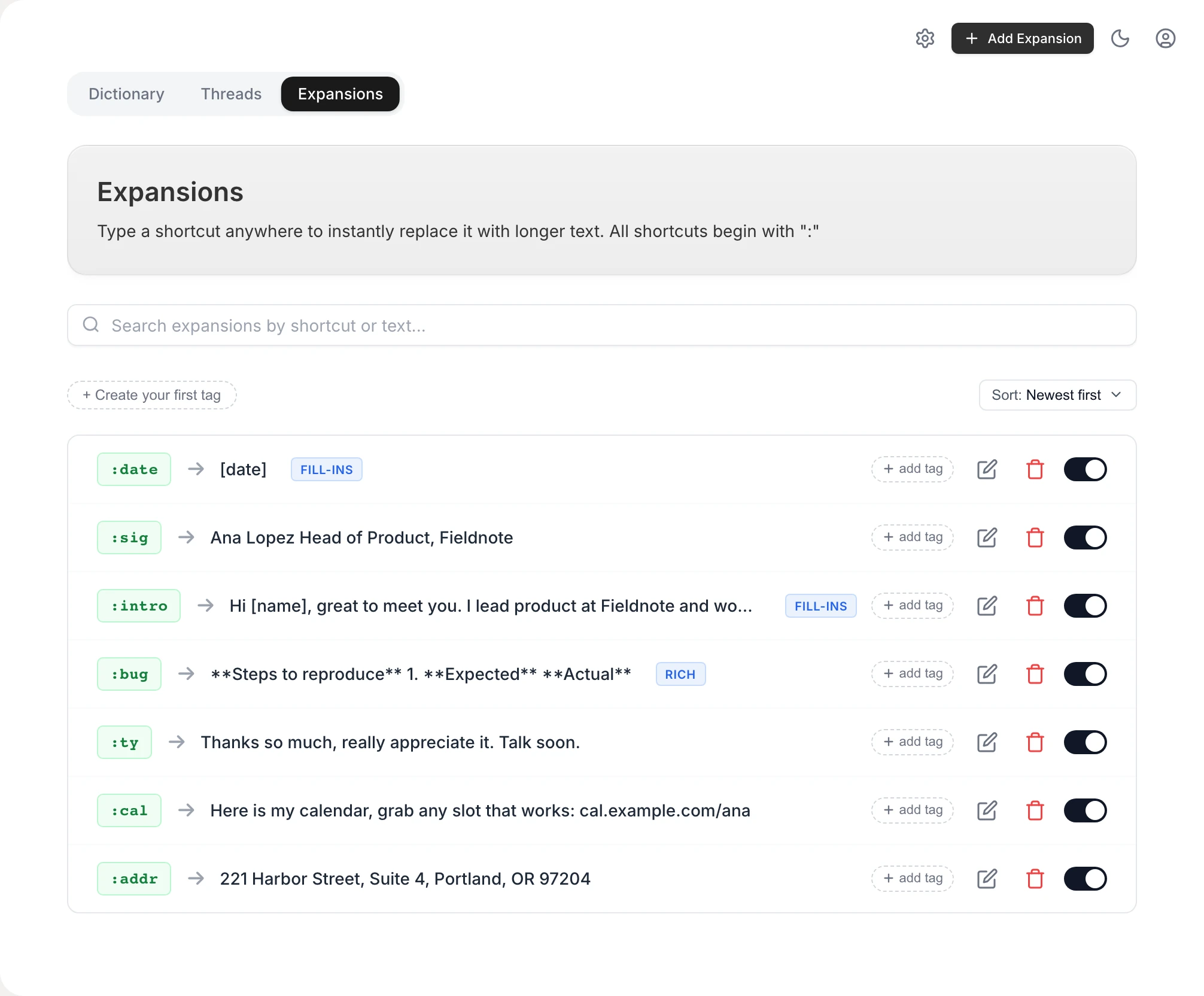
Vowen builds text expansion into the same app that handles your dictation. Create an expansion once — a shortcut that starts with a colon, like :sig, plus the text it stands for — and from then on, typing that shortcut anywhere replaces it with the full text the instant you finish typing it. No trigger key, no copy-paste, no switching windows. Expansions are typed text; dictation is spoken text; Vowen does both.
A real expander, not a gimmick
Works in every app
Expansion happens at the OS level, so shortcuts fire in email, browsers, docs, chat, and editors alike — anywhere you can type, on macOS and Windows.
Rich text, not just plain
Expansions can carry formatting — bold, links, headings, lists, colors — and land formatted in apps like Gmail, Notion, and Word, with a plain-text fallback for terminals.
Live date & time tokens
Built-in :date and :time expand to today's date and the current time, and any expansion can embed date/time tokens in the format you choose — ISO, US, verbose, 12h or 24h.
Instant, Espanso-style matching
Shortcuts expand the moment you type the last character — no space or Enter needed. Backspace mid-shortcut and the matcher keeps up, and international keyboard layouts are handled.
Suggestions as you type
Optionally, typing : pops a small dropdown of your matching shortcuts with previews — click one to insert it, without the dropdown stealing focus from the app you're in.
Voice and text in one tool
The same app gives you on-device dictation, AI cleanup, and meeting notes — so the boilerplate you type and the words you speak stop needing separate subscriptions.
How to set up text expansion
- 1
Download Vowen
Install the free app for macOS or Windows. On a Mac, grant Accessibility permission so expansions can work system-wide.
- 2
Open Library → Expansions
This is where your shortcuts live, alongside your dictation dictionary. Click Add Expansion.
- 3
Create a shortcut
Pick a trigger that starts with a colon — :sig, :addr, :intro — and write the replacement as plain or rich text. Add date or time tokens if you want them filled in live.
- 4
Type it anywhere
The instant you finish typing the shortcut in any app, it's replaced by your full text. Your clipboard is restored automatically afterwards.
Worth knowing
What's included — honestly
Vowen's expander covers the everyday cases: rich-text boilerplate, live date/time tokens, and instant system-wide expansion. It does not do programmable fill-in forms, scripts, or per-app rules — if you need those, a dedicated developer-oriented expander like Espanso is the better fit. The free tier includes one custom expansion plus the built-in :date and :time; Vowen Pro unlocks unlimited expansions with a one-time purchase, not a subscription.
Common questions.
Still deciding? Ask us anything.
What is a text expander?
A text expander is a utility that watches for short abbreviations you type — like :addr or :sig — and instantly replaces them with longer text: addresses, signatures, canned replies, code snippets, or entire templates. It saves retyping and keeps frequently-used text consistent.
Does it work in every app?
Yes — expansion happens at the operating-system level, not per app, so shortcuts work anywhere you can type: browsers, email clients, chat apps, documents, and editors, on both macOS and Windows. Rich-text expansions land formatted where the app supports it, with a plain-text fallback elsewhere.
Is Vowen's text expander free?
The free tier includes one custom expansion plus the built-in :date and :time shortcuts, so you can try the workflow properly. Unlimited expansions come with Vowen Pro — a one-time purchase rather than the monthly subscription most dedicated expander apps charge.
Can expansions include dates, formatting, and links?
Yes. Expansions can be rich text — bold, headings, lists, links, colors — and can embed live date and time tokens in ten date and six time formats, resolved at the moment you expand. The built-in :date and :time shortcuts use whatever format you set.
Will it fire accidentally while I type?
Shortcuts must start with a colon and contain no spaces, so normal typing never triggers one. Matching resets when you click elsewhere or use modifier keys, backspace is tracked correctly, and the expander pauses automatically while you're dictating.
How is this different from TextExpander or Espanso?
Dedicated expanders go deeper on power features — fill-in forms, scripting, team sharing. Vowen covers the everyday 90% — rich-text snippets, date/time tokens, instant expansion in every app — inside the same app that does your on-device dictation and meeting notes, priced one-time instead of monthly. If you need programmable snippets, Espanso is excellent; if you want typing and speaking shortcuts in one tool, that's Vowen.
More in Tools.
From meeting to minutes, without typing through it
Vowen records the meeting, transcribes it on your own computer with every speaker labeled, and drafts a structured summary — decisions, action items, who said what — that you review and turn into the official minutes. On Mac and Windows, with a one-time price.
OpenMeeting recorderRecord every meeting — without a bot in the room
Vowen records meetings from your own computer: your microphone and the other participants' audio, on Zoom, Teams, Google Meet, Webex, or across the table. You get the recording to replay, a speaker-labeled transcript, and a structured summary — processed on-device, stored locally, with nothing joining the call.
OpenAudio to SRTTurn audio into an SRT file on your own computer
Drop in an audio or video file and get a properly timed .srt or .vtt subtitle file — transcribed on-device, split into caption-sized lines, and free to export. No upload, no watermark, no per-minute meter.
Open
Stop retyping the same text
Download Vowen free and set up your first expansion in a minute — then let your voice handle the rest.